
Magento Development vs WooCommerce: 4 Myths That’ll Cost You Money
A jewellery business owner from Laxmi Road called me last month, frustrated. He’d spent ₹3.8 lakhs on a Magento store that took seven months to launch. His friend ran a similar-sized business on WooCommerce, spent ₹1.2 lakhs, and was live in six weeks.
“Did I get ripped off?” he asked.
Honestly? Maybe not. But he definitely made a choice based on some pretty common myths about Magento development and WooCommerce. And look, I’ve been building ecommerce websites in Pune for over 12 years now — for manufacturers in Pimpri-Chinchwad, retailers in Baner, healthcare product companies in Kharadi. I’ve seen both platforms do amazing things. And I’ve seen both platforms become expensive disasters.
Here’s the thing nobody tells you upfront: the whole “Magento development vs WooCommerce” debate is full of outdated advice, half-truths, and claims that sound good in theory but fall apart when you’re actually running a business in India.
So let’s talk about what’s actually true. Not what some generic ecommerce blog says. What actually happens when Indian SMBs choose one platform over the other.

Myth #1: “Magento Is for Big Businesses, WooCommerce Is for Small Ones”
This is probably the most repeated line in ecommerce circles. And it’s lazy thinking.
Here’s where this myth comes from: Magento (now Adobe Commerce) powers some massive stores — think Ford, Coca-Cola, Nike. WooCommerce started as a WordPress plugin for small shops. So people assume there’s this natural size divide.
But I’ve seen a ₹40 lakh/month furniture business in Wakad run beautifully on WooCommerce. And I’ve seen startups with zero revenue burn ₹5 lakhs building Magento stores they didn’t need.
Size isn’t the dividing line. Complexity is.
Think about it this way: if you’re selling 50 products, take payments through Razorpay, and ship via standard courier — WooCommerce handles this perfectly. The fact that you’re doing ₹2 crores in revenue doesn’t change that. You don’t need Magento development just because your revenue looks good.
But if you’re running different pricing for wholesale and retail customers, need multiple vendor management, want advanced inventory tracking across three warehouses, and operate separate storefronts for B2B and B2C — now we’re talking Magento territory. Even if you’re just starting out.
At Webcomp Digitex, we worked with a manufacturing client in Chakan who was doing ₹15 lakhs monthly revenue when they came to us. Small by many standards. But they needed complex catalogue management, customer-specific pricing, and integration with their ERP system. WooCommerce would’ve required so many plugins and custom code that Magento actually made more sense. We built their store, and six months later they were processing 400+ orders monthly with pricing rules that would’ve broken most WooCommerce setups.
Here’s what actually matters when choosing between these platforms:
Go with WooCommerce if:
- You have straightforward product catalogues
- Standard payment and shipping needs
- You want quick launches (4-8 weeks)
- Your budget is under ₹2 lakhs for development
- You need easy content management (it’s WordPress, after all)
Consider Magento development if:
- You need complex pricing rules or customer groups
- Multiple storefronts or languages from day one
- Advanced inventory management
- Heavy customization that goes beyond plugins
- You’re ready to invest ₹3-8 lakhs minimum
The revenue your business generates? Doesn’t automatically tell you which platform fits.
Myth #2: “WooCommerce Is Free, So It’s Cheaper”
I hear this constantly. And technically, yes, WooCommerce is open-source and free to download.
But let’s talk about what “free” actually costs.
A real estate developer in Hinjewadi wanted an ecommerce store to sell home furnishing packages. They heard WooCommerce was free and figured they’d save money. Here’s what they actually spent:
- Premium theme: ₹4,500
- Essential plugins (advanced shipping, payment gateway, wishlist, product filters, SEO): ₹18,000
- Security plugin: ₹8,000/year
- Backup solution: ₹6,000/year
- Performance optimization plugin: ₹7,000
- Annual renewals for plugin licenses: ₹12,000
That’s ₹55,500 before any custom development work. And this was a relatively simple setup.
Now here’s where it gets interesting. Magento Open Source is also free. The platform itself doesn’t cost anything. What costs money is the development time and hosting requirements.
A typical WooCommerce store we build at Webcomp Digitex might take 120-150 hours of development. A similar-complexity Magento store might take 200-250 hours. At standard development rates, that’s a significant difference — maybe ₹1.5 lakhs vs ₹3 lakhs.
But here’s what people miss: as you scale, WooCommerce often needs more ongoing maintenance. We had a healthcare products ecommerce client in Pune who started on WooCommerce. By the time they hit 500 products and 50+ daily orders, they were paying ₹15,000 monthly just to keep plugins updated and compatible with each other. One plugin update would break another. It became a part-time job.
After we migrated them to Magento, their monthly maintenance dropped to ₹8,000 because we weren’t juggling fifteen different plugin developers.
Think about it this way: WooCommerce is like building with Lego blocks. You can build impressive things, but you need lots of different pieces, and sometimes they don’t fit together perfectly. Magento is more like custom woodworking — higher upfront cost, but everything’s built to fit exactly.
Also, hosting. WooCommerce runs fine on shared hosting initially. You can start with ₹300/month. Magento needs proper server resources from day one — think ₹3,000-8,000 monthly minimum for decent performance.
So what’s actually cheaper? Depends on your three-year timeline, not your launch budget.
For simple stores with under 100 products and straightforward needs, WooCommerce usually stays cheaper. For complex stores or ones planning to scale significantly, Magento development often costs less in the long run because you’re not constantly adding plugins and patches.
Myth #3: “Magento Is Too Technical — You’ll Need Developers Forever”
Look, I’m not going to lie to you. Magento has a steeper learning curve than WooCommerce.
If you know WordPress basics, you can probably figure out WooCommerce product management in an afternoon. Magento takes a few days of training for someone to feel comfortable.
But “too technical” is an exaggeration that scares businesses away from a platform that might actually serve them better.
Here’s what’s actually true: day-to-day operations in Magento — adding products, processing orders, running promotions — aren’t rocket science. They’re just different from WordPress. After proper training, most business owners manage fine.
Where you need technical help:
- Initial setup and customization
- Adding complex features
- Module installations
- Performance optimization
- Major updates
Where you don’t need constant developer help:
- Regular product management
- Order processing
- Content updates
- Basic promotions and discounts
- Customer management
We trained a fashion retailer’s team in Baner — three people with zero technical background — to manage their Magento store. After two days of training and a documented workflow, they were handling everything except major feature additions.
WooCommerce does have the advantage here, honestly. Because it’s WordPress underneath, finding people who know basic WordPress is easy. You could train a college intern to manage a WooCommerce store in a few hours.
But here’s the thing about needing developers: if you’re running any serious ecommerce business, you’re going to need technical help regardless of platform. WooCommerce stores need developer support too — for customization, optimization, troubleshooting plugin conflicts.
The real question isn’t “will I need developers?” It’s “how often and for what?”
With WooCommerce, you’ll need developers more frequently for smaller things because you’re stitching together various plugins. With Magento development, you need developers less frequently but for bigger implementations.
At Webcomp Digitex, we see different support patterns:
WooCommerce clients typically contact us 3-4 times monthly with small issues — plugin conflicts, minor customization needs, performance questions.
Magento clients might go 2-3 months without needing support, then need us for a full day when they want to add a major feature.
Neither is better or worse. Just different operational styles.
Also worth noting: finding good Magento developers in Pune isn’t as hard as people claim. Yes, there are fewer Magento specialists than WordPress developers. But any custom web application development company worth working with should have solid Magento expertise.

Myth #4: “Performance and Security Are the Same — Just Get Good Hosting”
This one’s partly true, which makes it dangerous.
Yes, good hosting helps both platforms. But pretending they’re identical in performance and security requirements is setting yourself up for problems.
Magento is resource-heavy out of the box. No sugar-coating it. A basic Magento store on cheap shared hosting will crawl. You need proper server resources — think VPS minimum, ideally cloud hosting with caching layers.
WooCommerce runs lighter initially. You can start on shared hosting and be fine for a while.
But here’s where it gets interesting. As you scale, WooCommerce performance becomes a plugin management game. Each plugin you add creates more database queries, loads more scripts, adds potential slowdown points.
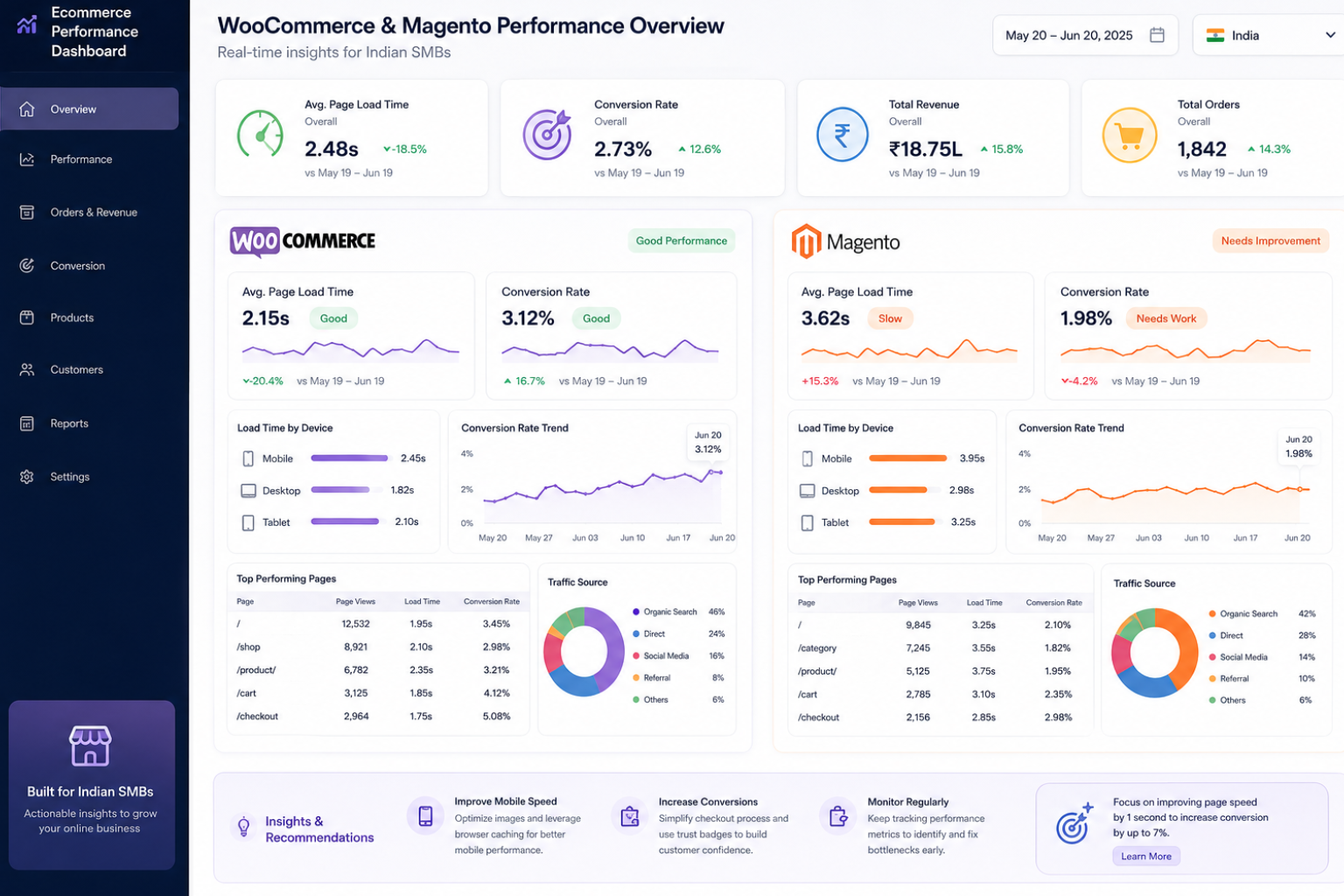
We had an ecommerce app development company client running WooCommerce with 18 active plugins. Their page load time was 4.8 seconds. We optimized, got it down to 2.9 seconds. Still not great.
A comparable Magento store we built for a similar business loaded in 1.8 seconds because everything was built into the core architecture rather than bolted on.
Speed matters. Google confirmed page speed is a ranking factor. But more importantly, real customers bounce on slow sites. We tracked this for a Pimpri-Chinchwad manufacturing client — every second of load time over two seconds cost them about 7% in conversion rate.
Security is a different angle. Both platforms are secure if properly maintained. But WooCommerce security depends heavily on keeping WordPress core, theme, and all plugins updated. Miss one plugin update and you’ve got a vulnerability.
Magento has fewer moving parts to maintain. But when security patches come out, they’re critical — you can’t skip them.
Real talk from 12 years of doing this: I’ve seen more WooCommerce sites get hacked. Not because WooCommerce itself is less secure, but because it’s more popular and often managed by people who don’t update regularly. It’s the digital equivalent of leaving your shop unlocked because you forget.
Magento stores get targeted less frequently, and when properly set up with security patches current, they’re solid.
But — and this is important — security isn’t just about the platform. It’s about maintenance discipline. If you’re not going to update regularly, hire someone who will. We offer security monitoring as part of our Webcomp Digitex maintenance packages for exactly this reason.
Here’s a practitioner insight you won’t read in most comparison articles: check your payment gateway requirements carefully. Some payment processors have specific certification requirements for different platforms. We’ve had clients choose platforms based on business needs, then discover their preferred payment gateway worked better with the other option. Do that research before you commit.
What Actually Works: Making the Right Choice for Your Business
Forget what platform your competitor uses. Forget what some article written for US businesses says. Here’s how to actually decide.
Start with these questions:
1. What’s your realistic budget — not just launch, but year one?
If you’ve got ₹1.5 lakhs for development and ₹10,000 monthly for hosting and maintenance, you’re in WooCommerce territory. If you can invest ₹4-6 lakhs upfront and ₹15,000+ monthly, Magento becomes viable.
2. How complex is your catalogue and pricing?
Selling 50 products at fixed prices? WooCommerce handles it perfectly. Need customer-group pricing, complex attributes, multiple catalogues? Magento development makes sense.
3. How fast do you need to launch?
Need to be live in 6 weeks for a seasonal push? WooCommerce gets you there. Can you invest 3-4 months building it right? Magento’s an option.
4. What’s your 18-month growth plan?
If you’re testing a market and might pivot completely, start simple with WooCommerce. If you’re entering a market you know well and plan to scale aggressively, Magento might save you a painful migration later.
5. Do you have technical resources or budget for them?
A team member who knows WordPress? WooCommerce leverages that. Budget to hire technical help when needed? Either platform works.
I’m not going to tell you one platform is universally better. That’s garbage advice.
At Webcomp Digitex, we’ve built successful stores on both. We’ve also seen businesses choose wrong for their situation and pay for it.
A Kharadi-based electronics retailer came to us after spending ₹4.2 lakhs on Magento development. They had 30 products, simple shipping, standard pricing. Total overkill. We migrated them to WooCommerce, cut their monthly costs in half, and they’re doing great.
Conversely, a textile wholesaler in MIDC Bhosari started on WooCommerce, hit scaling problems at 800 products and complex bulk pricing, and ended up spending ₹2.8 lakhs migrating to Magento anyway — on top of the ₹1.5 lakhs they’d already spent on WooCommerce.
Both situations were avoidable with better initial planning.
Here’s my honest recommendation: if you’re unsure, start by mapping your actual requirements in detail. Not “I want an online store.” Get specific:
- How many products at launch and in 12 months?
- What payment methods do you need?
- Any special pricing rules or customer groups?
- Integration needs with existing systems?
- Multiple languages or currencies?
- Special shipping calculations?
Show that list to an ecommerce website development team that works with both platforms (like us, but any good custom web application development company should do this). Get their honest input based on your specific situation.
Don’t choose based on what platform sounds more impressive or what you’ve heard is “better.” Choose based on what actually fits your business requirements and budget reality.
Frequently Asked Questions
Can I migrate from WooCommerce to Magento later if I outgrow it?
Yes, but it’s not trivial. We’ve done several migrations, and while product data, customer information, and order history can move over, you’re essentially rebuilding the store. Budget ₹2-4 lakhs minimum for a proper migration depending on customizations. Some businesses find this worthwhile when complexity demands it, but it’s better to choose right initially if you can predict your needs reasonably.
Which platform is better for SEO?
WooCommerce has an edge here because it’s WordPress underneath, and WordPress is naturally SEO-friendly. Tools like Yoast SEO work seamlessly. That said, Magento 2 has solid built-in SEO features — URL rewrites, meta tags, sitemaps, canonical tags. We’ve gotten both platforms ranking well in Google. The difference comes down to ease of use more than capability. If SEO is critical and your team isn’t technical, WooCommerce is more approachable.
What about mobile apps — does platform choice matter?
If you’re planning native mobile apps (not just responsive web), this affects your decision. Both platforms have API capabilities, but Magento’s REST and GraphQL APIs are more robust for complex app functionality. For an ecommerce app development company building your mobile app, Magento often provides cleaner integration. WooCommerce can work with the WooCommerce REST API, but complex features sometimes require additional customization.
How much should I budget for Magento Development vs WooCommerce ongoing maintenance?
For WooCommerce: expect ₹8,000-15,000 monthly for professional maintenance covering updates, security monitoring, backups, and minor tweaks. For Magento development and maintenance: budget ₹12,000-25,000 monthly depending on store complexity. These are Pune market rates from our experience at Webcomp Digitex. DIY maintenance is possible but risky unless you really know what you’re doing.
Can I switch themes easily on both platforms?
WooCommerce makes theme switching relatively easy — might take a few hours to reconfigure. Magento theme changes are more involved because themes are more tightly integrated with functionality. Budget a few days of developer time for Magento theme switches. This is another reason to get your design right initially with Magento rather than planning to change it frequently.
Ready to Build Your E-Commerce Store the Right Way?
Look, choosing between Magento development and WooCommerce isn’t about picking the “best” platform. It’s about picking the right one for your specific business situation.
We’ve built both at Webcomp Digitex for over 12 years, working with manufacturers, retailers, healthcare companies, and service businesses across Pune — from Hinjewadi to Pimpri-Chinchwad to Kharadi. We’re not going to push you toward one platform because we make more money on it or because we only know one.
We’re going to ask about your products, your customers, your growth plans, and your realistic budget. Then we’ll recommend what actually makes sense.
Sometimes that’s a ₹1.2 lakh WooCommerce store that launches in five weeks. Sometimes it’s a ₹5 lakh Magento build that takes three months but sets you up properly for scale. Sometimes it’s not ecommerce at all yet — maybe you need to test with marketplace selling first.
We’re based in Pune, we understand Indian SMB realities, and we’ve seen what works and what becomes expensive regret.
Want to talk through your specific situation? Not a sales pitch — just an honest conversation about what platform fits your needs.
Call us at +91-9960802498 or visit webcompdigitex.com.
Let’s figure out the right ecommerce foundation for your business. Because choosing wrong costs a lot more than choosing carefully.

