React vs Angular vs Vue: Choosing the Right Framework for Your Web Application Development Services
I still remember the panic in that manufacturing owner’s voice when he called me last year. His Chakan factory had paid ₹8.5 lakhs for a custom inventory management web app. Six months in, the agency ghosted him. The codebase? Built with a framework none of the local web app developers in Pune wanted to touch.
Here’s the thing: choosing the wrong framework doesn’t just cost you money upfront. It costs you when you need to add features. When you need to find developers. When the whole thing needs maintenance three years down the line.
And honestly, most articles about React vs Angular vs Vue read like they were written by developers showing off, not helping business owners make actual decisions. So let me break this down the way I explain it to clients at Webcomp Digitex — starting with what actually matters for your business.
Understanding What These Frameworks Actually Do (And Why You Should Care)
Think of a framework like the foundation and structure of a building. You could technically build a house by cutting every single piece of wood yourself and figuring out how to make them stand up. Or you could use pre-designed architectural plans and building systems that solve common problems.
React, Angular, and Vue are those pre-designed systems for web applications. They’re collections of pre-written code that handle the repetitive, complex stuff so web application developers can focus on building features specific to your business.
Here’s what I mean practically: Let’s say you’re building a dealer management system for your real estate business in Baner. When a customer clicks “Schedule Site Visit,” you want that form to appear smoothly, validate the phone number, show available slots, and update without refreshing the entire page. All three frameworks can do this. But they do it differently, and those differences matter when you’re three months into development or two years into maintenance.
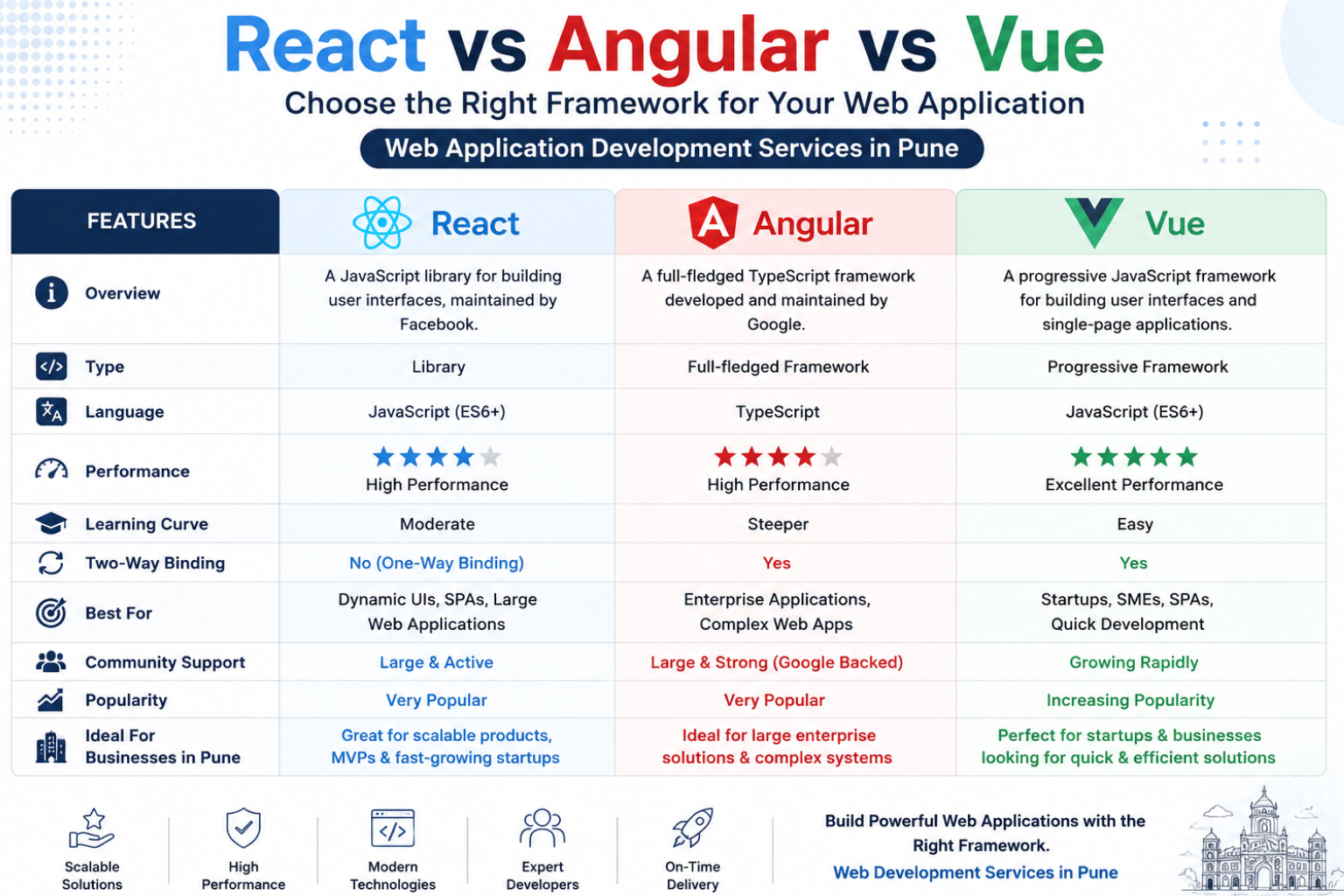
React is technically a library, not a full framework, but everyone calls it one anyway. Facebook created it and uses it for, well, Facebook. It’s like getting modular furniture — you pick the pieces you need and assemble them your way. Flexible, but you need to make more decisions.
Angular is a complete framework from Google. It’s more like buying a fully-furnished room. Everything’s included, everything works together, but you follow Google’s way of doing things. Less flexibility, fewer decisions to make.
Vue is the newcomer (relatively speaking), created by an ex-Google developer. It’s somewhere in between — easier to learn than Angular, more structured than React. Think of it as furniture that’s mostly assembled but you can still customize it fairly easily.
Step 1: Match the Framework to Your Project Type (Not the Hype)
I’ve seen too many businesses in Pimpri-Chinchwad pick React because “that’s what everyone uses” and then struggle with the complexity. Start here instead:
Choose Angular if:
- You’re building a large, complex enterprise application
- You have structured requirements that won’t change much
- You need everything decided for you (routing, forms, HTTP calls, testing)
Real example: We used Angular for a healthcare client’s hospital management system in Kharadi. Multiple user roles (doctors, nurses, admin, reception), complex data relationships, strict compliance requirements. Angular’s opinionated structure meant less decision fatigue and consistent code across the team.
Choose React if:
- You need maximum flexibility
- You’re building something consumer-facing that needs to feel fast
- You want the largest pool of web app developers to choose from later
We built an e-commerce platform for a Pune-based furniture manufacturer using React. They needed custom product configurators, real-time inventory updates across multiple warehouses, and frequent UI changes based on customer feedback. React’s component-based approach made iteration smooth.
Choose Vue if:
- You’re starting simpler and might scale up later
- You have less experienced developers (or are learning yourself)
- You want good documentation and an easier learning curve
A real estate client in Hinjewadi came to Webcomp Digitex wanting to start with a basic lead management system with plans to add property management features later. Vue let us build fast, keep the code readable, and add complexity gradually.
The thing that trips most people up here: Don’t choose based on what’s “best” in the abstract. Choose based on who’s maintaining it. If you have an in-house developer who’s amazing with Angular, that matters more than React being more popular.
Step 2: Calculate the Real Cost (It’s Not Just Development)
Here’s a conversation I have at least twice a month with manufacturing clients in the MIDC area: “React development costs more? I thought it was open-source and free?”
Yes, all three frameworks are free. But your total cost includes:
Initial Development Time:
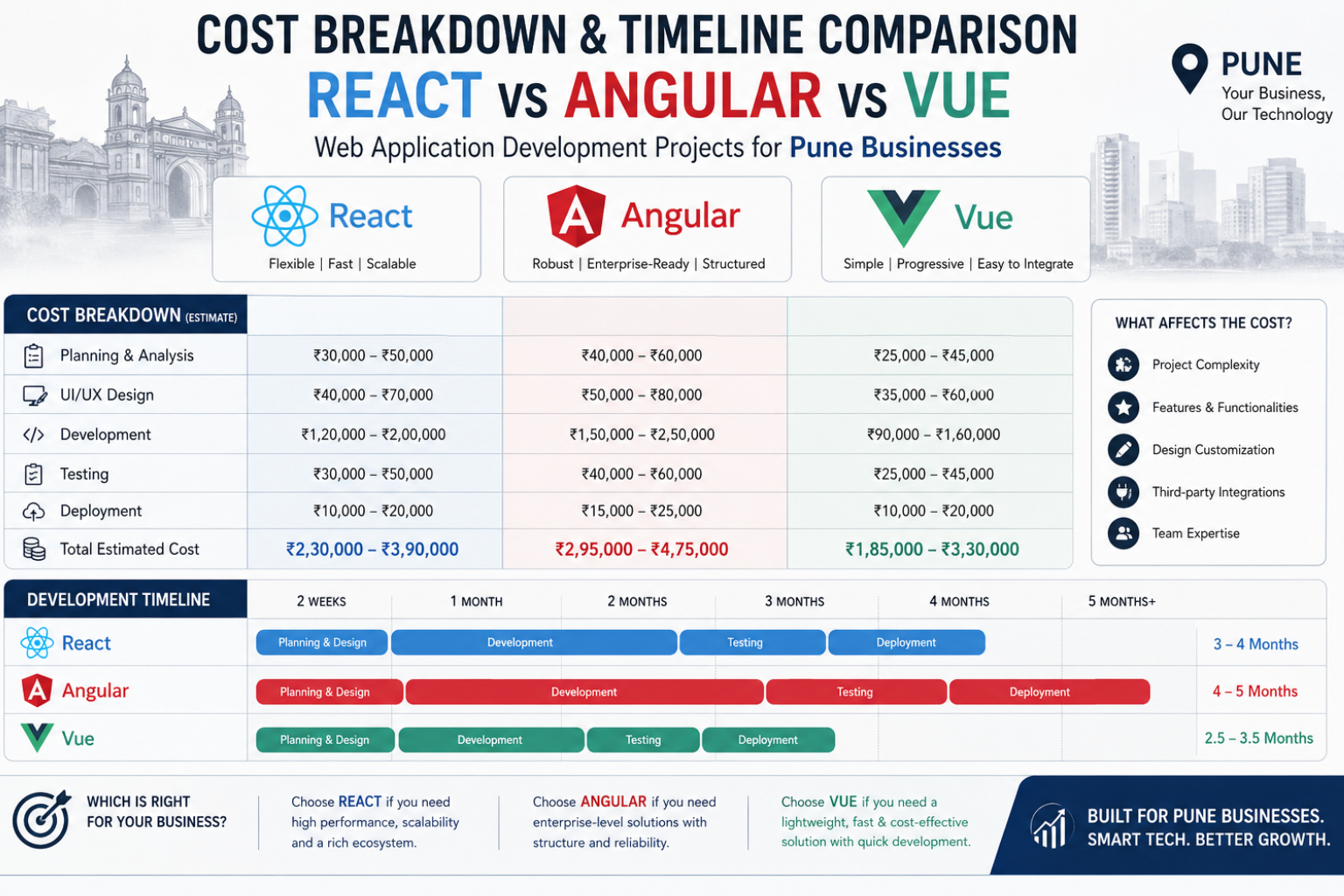
- Angular: Usually 15-20% slower initially because there’s more to set up
- React: Fast to start but can slow down when you need to pick and integrate additional libraries
- Vue: Generally fastest for simple to medium projects
Developer Availability and Cost:
React developers are everywhere in Pune — Kharadi, Hinjewadi, you name it. But that high demand means rates are typically ₹50,000-₹1,20,000/month for good developers. Angular developers are fewer but rates are similar, around ₹45,000-₹1,00,000/month. Vue developers are less common in Pune but often more affordable, ₹40,000-₹90,000/month.
Maintenance and Updates:
This is where it gets interesting. A client in Wakad learned this the hard way. Their React app used 23 third-party libraries. When one security vulnerability appeared in a minor library, it took three days of developer time to update everything without breaking features. Angular apps typically use fewer external dependencies, so updates are more predictable.
Feature Addition Timeline:
From my experience, adding new features to a Vue codebase is consistently fastest for small to medium apps. React is extremely fast for large apps if the initial architecture was solid. Angular is steady regardless of size but rarely the fastest.
Here’s the practical step: Get quotes not just for building version 1.0. Ask web application development services providers for estimates on:
- Adding three new features six months later
- Security updates for year two and three
- Switching developers if needed
When we quote at Webcomp Digitex, we always show these numbers separately. A ₹6 lakh React app might need ₹1.8 lakhs annual maintenance. A ₹7 lakh Angular app might need only ₹1.2 lakhs. Suddenly the cheaper option isn’t cheaper.
Step 3: Test Developer Availability in YOUR Context
This is something I learned the hard way, and honestly, I don’t see other agencies talking about it enough.
Pune’s developer market is concentrated. Most experienced React and Angular developers work in product companies in Hinjewadi or Kharadi IT parks. They’re not typically available for freelance or small agency projects. The web application developers you’ll actually get access to as an SMB are either:
- Junior developers (1-3 years experience)
- Freelancers between jobs
- Small agencies like Webcomp Digitex with retained teams
Here’s your actual action step:
Post a simple job listing on Naukri or Internshala right now. Not to hire, just to test. Title it something like “React Developer for Ongoing Project — Pune” and “Angular Developer for Ongoing Project — Pune.” Do this for all three frameworks. Use a simple Gmail address if you don’t want to use your company email.
Wait 48 hours and count responses. Check their experience level and rate expectations.
When we did this exercise last year for a client trying to decide, React got 47 responses (18 relevant), Angular got 23 responses (11 relevant), Vue got 9 responses (4 relevant). That client was in manufacturing in MIDC and needed someone who could come to the factory occasionally. Suddenly React’s popularity mattered because they had real options.
The thing that trips people up: Don’t assume developer availability in Bengaluru or Mumbai applies to Pune. Our market is different, especially if you need someone to work from your office occasionally or need Marathi/Hindi communication.
Step 4: Run a Technical Proof-of-Concept for Your Specific Needs
I’m not 100% sure why more web application development services don’t recommend this, but here it is: before committing ₹5-10 lakhs to full development, spend ₹30,000-₹50,000 on a proof-of-concept.
Here’s how we do it at Webcomp Digitex:
Pick the single most technically challenging feature of your planned web app. Not the whole thing. Just one piece.
For that real estate client I mentioned? It was the property search with map integration showing available units in real-time. For a healthcare client in Baner, it was the appointment scheduling logic with doctor availability conflicts.
Build that one feature in your top two framework choices. Actually build it, don’t just discuss it.
You’ll discover:
- How fast development actually moves
- Whether the framework handles your specific data complexity
- How the code looks and feels to maintain
- Whether integrations with your existing systems (accounting software, Google Sheets, whatever) work smoothly
That manufacturing client I mentioned at the start? Turned out their inventory system needed a front end for Google Sheets because their production team wasn’t going to change their process. React’s ecosystem had better libraries for the real-time Google Sheets sync we needed. We wouldn’t have known that from articles or discussions.
Timeline: A good proof-of-concept takes 1-2 weeks. If an agency tells you they can’t do this, or it’s unnecessary, that’s a red flag.
Step 5: Check Framework Longevity and Migration Paths
Vue 2 stopped getting updates in December 2023. If you built a Vue 2 app in 2021 (which was the stable version then), you’re now looking at migration costs.
Angular has had several breaking changes between major versions. Moving from AngularJS to Angular 2+ was essentially a complete rewrite for many apps.
React has been more stable with breaking changes, but the ecosystem around it moves fast. Libraries you use today might be abandoned next year.
Your action step here:
Ask your potential web application developers: “What’s your migration plan when [framework version] stops being supported?”
A good answer includes:
- Specific timeline estimates
- Cost ranges for migration
- Whether they’ll be available to do it or will document it for others
- Examples of migrations they’ve done before
Look, three years feels like forever when you’re excited to build something new. But I’m currently working with a real estate client in Pimpri-Chinchwad whose AngularJS app from 2016 needs a complete rebuild. That’s ₹4.2 lakhs they didn’t budget for. They’re frustrated, and I get it.
The thing that trips people up: Assuming your first version is your final version. It never is. Factor in change from day one.
Step 6: Evaluate Integration Requirements Now, Not Later
This is something I learned working with manufacturing clients who use everything from Tally to custom ERP systems built by their nephew’s friend ten years ago.
Your web app won’t exist in isolation. It needs to talk to:
- Payment gateways (Razorpay, PayU, whatever)
- Accounting software
- Email systems
- SMS providers
- Analytics (GA4, not the old Universal Analytics everyone ignored)
- Possibly Google Sheets if you’re like 60% of Pune SMBs I work with
- Your existing website or mobile app
Here’s your action step:
Make a list of every system your new web app needs to connect with. Then ask developers: “Show me an example of [React/Angular/Vue] connecting to [your specific system].”
Don’t accept “oh yes, that’s definitely possible.” Make them show you. Code samples, documentation links, npm packages, whatever.
We once quoted a project in Hinjewadi where the client used a specific lab equipment system that generated reports. Turned out Vue had almost no existing libraries for that integration. React had two, one poorly maintained. Angular had one well-maintained option. That single factor drove the decision, and the client avoided weeks of custom integration work.
The thing that trips people up: Assuming “it’s all just APIs, they all work the same.” They don’t. Some frameworks have better tooling for specific integrations, and that saves you real time and money.

Step 7: Make Your Decision Based on the Next Hire, Not the Current One
Here’s a scenario that plays out constantly: A business hires a talented developer. That developer loves React. They build a React app. It’s great. Two years later, the developer leaves for a product company in Kharadi.
Now what?
If you chose React because your developer loved React, you’re stuck. If you chose React because React has the deepest developer pool in Pune and you have documentation, onboarding materials, and a clear architecture, you’ll be fine.
Your final action step:
Before you commit to a framework, create this simple document (or have your developers create it):
“Onboarding a New Developer to [Your App Name]”
Include:
- How to set up the development environment (step by step)
- How the app is organized (what code lives where)
- How to make a simple change (add a button, change text)
- How to deploy updates
- Who to contact when something breaks
If your current web app developers can’t create this document clearly, you have a problem regardless of framework choice. If they can, you’re protected.
We provide this as standard at Webcomp Digitex because I’ve seen too many businesses held hostage by developers who built something only they understood.
When to Actually Ignore All This Advice
Look, I’ve just given you seven steps and a lot to think about. But here’s when you should ignore most of it:
If you’re doing a simple, short-term project (under ₹2 lakhs, under 3 months timeline), just pick whatever your developer knows best. The framework choice won’t make or break you. The developer’s skill matters 10x more.
If you found a developer or agency you really trust, go with their recommendation. At Webcomp Digitex, if a client trusts us, we’ll make the framework choice based on our team’s current capacity and expertise. A skilled team building in their preferred framework will outperform an unskilled team using the “right” framework every time.
If you need it done by yesterday, you don’t have time for proof-of-concepts and testing. Pick React for maximum developer availability and move.
But if you’re building something important, something you’ll live with for years, something that’ll cost more than ₹5 lakhs? Then yes, walk through these steps. I’ve seen them save clients from expensive mistakes too many times.
The Framework Decision Nobody Talks About: Can You Switch Later?
Here’s something that might just be my experience, but I think it’s worth saying: The framework you start with doesn’t have to be the framework you end with.
A healthcare client in Pune started with Vue because they wanted to move fast and had a tight budget. Two years later, they’d grown significantly and needed features Vue wasn’t handling well at their new scale. We rebuilt specific performance-critical modules in React while keeping the Vue core.
Did it cost money? Yes, about ₹2.8 lakhs for the partial migration. Was it still cheaper than building everything in React from day one? Also yes. They would’ve run out of money before launching if we’d done that.
This isn’t always possible, and it’s not ideal, but it’s an option if you’re genuinely unsure. Start with what works for you today. Good architecture matters more than perfect framework choice.
Frequently Asked Questions
Which React vs Angular vs Vue framework is fastest for web application development?
For pure development speed on small to medium projects, Vue is consistently fastest in my experience. We built a basic dealer management portal for a Wakad-based manufacturer in Vue in about 3 weeks. The same scope in React would’ve taken 4-5 weeks due to library selection decisions. Angular would’ve been 5-6 weeks because of initial setup complexity. But here’s the catch: once projects cross a certain complexity threshold (think 50+ pages, complex data relationships, multiple user roles), React and Angular often become faster because their structure prevents the mess that can develop in large Vue apps. Choose based on your specific project size, not framework speed in the abstract.
Can I find web app developers in Pune for all three frameworks?
React developers are everywhere in Pune — you’ll find them in Hinjewadi, Kharadi, even Pimpri-Chinchwad industrial areas. We see 3-4 qualified React candidates for every open position. Angular developers are less common but still available, maybe 1-2 good candidates per position. Vue developers are genuinely hard to find in Pune. We’ve had positions open for 6+ weeks without finding local Vue experts. If you choose Vue, factor in either training developers from other frameworks (3-4 weeks), hiring remote developers, or working with an agency like Webcomp Digitex that already has Vue expertise. This is a real constraint that affects timelines and costs, especially if you need someone to work from your office occasionally.
Does Google rank web apps built with different frameworks differently?
No, Google doesn’t care whether you used React, Angular, or Vue. I’ve tested this extensively with clients across Pune. What Google cares about is page speed, mobile responsiveness, and content quality. However, different frameworks make it easier or harder to achieve good SEO. React requires extra work for server-side rendering to be SEO-friendly (doable but adds complexity). Angular has better built-in SEO support. Vue is somewhere in between. A manufacturing client in Chakan had a React web app that initially ranked poorly because it wasn’t set up for SEO properly. After fixing the server-side rendering issues (3 weeks of work, ₹85,000), rankings improved significantly. The framework didn’t matter; the implementation did.
How much does web application development cost for each framework?
In Pune’s market, React projects typically run ₹4-12 lakhs for a standard business web app (think CRM, inventory system, booking platform). Angular projects usually cost ₹5-14 lakhs for similar scope because fewer developers and slightly longer timelines. Vue projects run ₹3.5-10 lakhs, mainly because agencies willing to work in Vue often have lower rates. But honestly, framework choice isn’t your biggest cost driver. Project complexity is. A complex React app with lots of integrations can cost ₹20+ lakhs. A simple Angular app might be ₹3 lakhs. At Webcomp Digitex, we see bigger cost variations from clear versus unclear requirements than from framework choice. If you know exactly what you want, you’ll pay less regardless of framework.
Is it better to hire freelance web application developers or an agency?
This depends entirely on your risk tolerance and timeline. Freelancers in Pune charge ₹800-2,500/hour depending on experience. They’re often faster for small projects and cheaper overall. But here’s what I’ve seen go wrong: freelancer gets a full-time job and disappears halfway through (happened to 3 clients we rescued last year), freelancer builds something only they understand, or freelancer isn’t available when something breaks six months later. Agencies like Webcomp Digitex cost more upfront — usually 25-40% more than freelancer rates — but you get continuity, accountability, and a team instead of one person. If your project is under ₹2 lakhs and straightforward, a skilled freelancer is probably fine. Above ₹5 lakhs or if the app is critical to your business? Agency makes sense for the security.
Can I build a front end for Google Sheets with these frameworks?
Yes, all three frameworks can connect to Google Sheets and build custom interfaces around them. React has the most libraries and examples for Google Sheets integration — we used React for a real estate client in Baner who needed a custom front end for their property database in Sheets. The ecosystem made development faster. Angular also works fine with Google Sheets API but has fewer ready-made solutions. Vue works but you’ll write more custom code. Practically speaking, the Google Sheets API is the same regardless of framework, so the difference is just how much pre-built tooling exists. If Google Sheets integration is your primary need, I’d recommend React or hiring web application development services (like us) who’ve done it before, regardless of framework. The API setup and authentication are trickier than the framework choice.
Ready to Make the Right Framework Choice for Your Business?
Look, I’ve thrown a lot at you. Seven steps, dozens of considerations, real examples from Pune businesses that worked (and some that didn’t).
Here’s what I actually want you to take away: The “best” framework doesn’t exist. The best framework for your specific business, with your specific requirements, budget, and timeline — that exists. And figuring it out requires asking better questions than “which is fastest” or “which is most popular.”
At Webcomp Digitex, we’ve built web apps in all three frameworks for manufacturing units in Chakan, real estate companies in Hinjewadi, healthcare providers in Kharadi, and e-commerce businesses across Pune. We don’t have a favourite framework. We have a favourite outcome: you getting a web app that solves your actual problem, costs what we said it would, and doesn’t turn into a maintenance nightmare.
If you’re trying to make this decision right now and want a straight answer based on your specific situation, just call us. Seriously. Call +91-9960802498 or email through webcompdigitex.com.
We’ll spend 20-30 minutes understanding what you’re actually building, walk through these considerations with your real numbers and requirements, and tell you honestly what makes sense. Even if you don’t work with us, you’ll have clarity on the decision. And if you do work with us, you’ll know exactly why we’re recommending what we’re recommending.
We’re based in Pune, we’ve worked with businesses exactly like yours, and we’re not interested in selling you what’s trendy. We’re interested in web application development services that actually work for Pune SMBs who need results, not buzzwords.
Let’s figure out the right choice together.


