API Integration in Web Apps: A Business Owner’s Guide to Web Application Development Services
Last month, a manufacturing client from Chakan called us in panic mode. Their new inventory management system couldn’t talk to their accounting software. Orders were piling up. Their team was manually entering data twice — once in the web app, once in Tally. Three people, eight hours a day, just copying numbers.
Here’s the thing: they’d spent ₹4.2 lakhs on custom web application development. The app worked fine. But nobody told them about API integration. Nobody explained that modern web apps need to connect with other systems to actually save time and money.
That’s exactly why this API Integration Guide is important. It will help you understand how APIs connect your web application with essential business tools, automate workflows, eliminate manual data entry, and maximize the value of your software investment.
If you’re looking at web application development services right now, or if you already have a web app that feels like it’s working in isolation, this guide is for you. I’m going to walk you through what API integration actually means, why it matters for your business, and exactly how to get it done without the technical nonsense.
API Integration Guide: What API Integration Actually Means (And Why You Should Care)
Think of your web app as a really smart employee. But here’s the problem: this employee doesn’t talk to anyone else in your company. They do their job well, but they can’t share information with your accounting team, your CRM, your payment gateway, or your shipping partner.
That’s what happens when you build a web app without API integration.
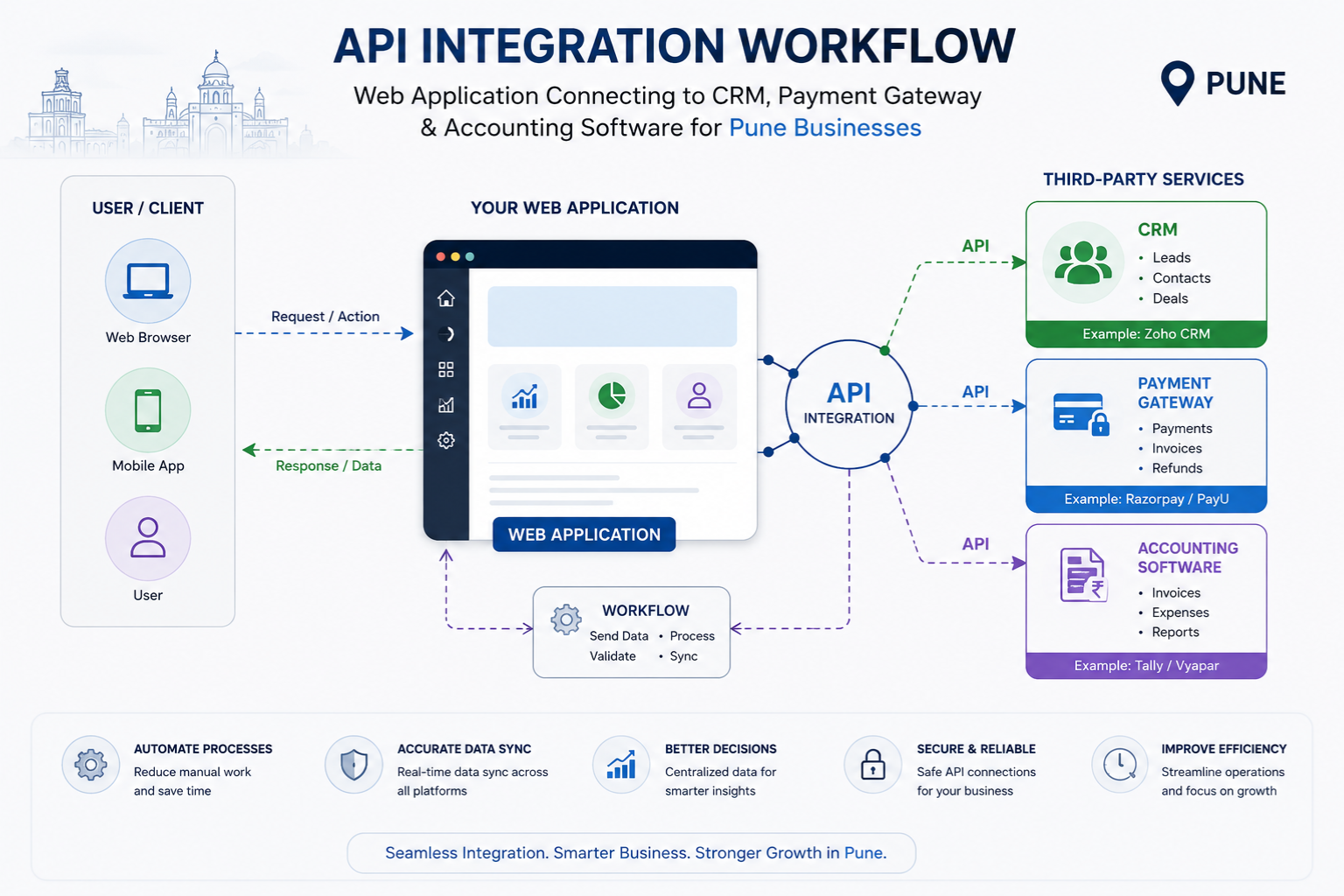
An API (Application Programming Interface) is basically a messenger. It lets your web app send and receive information from other software systems automatically. No manual data entry. No copy-paste. No mistakes.
Here’s a real example from our work at Webcomp Digitex. We built a web app for a real estate developer in Baner. They needed their project management system to connect with:
- Their CRM (Zoho)
- Their payment gateway (Razorpay)
- WhatsApp Business API for customer updates
- Their accounting software
Before integration, their sales team was updating four different systems for every single customer interaction. After we set up the APIs, one entry in the web app automatically updated everything else. They cut admin time by 60%. Their cost per lead dropped from ₹8,200 to ₹3,100 in six months because the sales team could actually focus on selling instead of data entry.
But here’s what most web application development agencies won’t tell you upfront: API integration isn’t a one-time thing. It needs planning, testing, and maintenance. And if you don’t know what to ask for, you’ll end up like that Chakan manufacturer — with a beautiful web app that doesn’t actually solve your problems.
Step 1: Figure Out What Needs to Talk to What
Before you even think about talking to a custom web application development company, sit down and map out your actual workflow.
Grab a whiteboard or a sheet of paper. Draw your current process. Where does data come from? Where does it go? Which software systems are you using right now?
Most businesses in Pune that we work with use some combination of these:
- Accounting: Tally, QuickBooks, Zoho Books
- CRM: Salesforce, Zoho CRM, HubSpot
- Payment gateways: Razorpay, Paytm, Instamojo
- Communication: WhatsApp Business, email marketing tools
- Shipping: Delhivery, Shiprocket, Bluedart
- E-commerce: Shopify, WooCommerce
- Storage: Google Drive, Dropbox
Write down every system you currently use. Then write down what information needs to flow between them.
Here’s what trips most people up at this step: they think about what they want instead of what they actually need. You don’t need your web app to integrate with fifteen different systems on day one. Start with the two or three integrations that will save you the most time or money.
For that Chakan manufacturer, we started with just two integrations: Tally for accounting and their existing order management system. That solved 80% of their problem. Six months later, we added WhatsApp API for customer notifications. One step at a time.
A healthcare clinic we worked with in Kharadi wanted to integrate with ten different systems. We convinced them to start with three: their appointment booking system, their payment gateway, and their SMS provider for reminders. That alone cut no-shows by 40% and freed up two hours of reception time every day.
Don’t overcomplicate this step. Focus on pain points, not possibilities.
Step 2: Check If Those Systems Actually Have APIs
Not every software system has an API. And some have APIs that are absolutely terrible to work with.
Before you commit to any web application development services, you need to verify that the systems you want to connect actually support integration.
Here’s how to check:
- Go to the software’s website and look for “API documentation” or “Developers” in the footer
- If you can’t find it, email their support and ask directly: “Does your system have an API for integration?”
- Ask what information can be accessed or modified through the API
Some systems have amazing APIs. Razorpay, for example, makes it really easy to integrate payments. Their documentation is clear, and most web app development agencies in Pune are already familiar with it.
Other systems have APIs that are technically available but practically useless. I won’t name names, but we’ve encountered accounting software that claims to have an API but only lets you read data, not write it. That means you can pull reports but you can’t actually create entries from your web app. Defeats the whole purpose.
And some systems — especially older ones built for the Indian market — don’t have APIs at all. Tally is a classic example. There are workarounds (we use Tally’s ODBC connector or third-party APIs), but it’s not as smooth as working with modern software.
What to watch out for: some software companies charge extra for API access. We’ve seen this with certain CRM systems — they advertise having an API, but you need their “Enterprise” plan to actually use it. Factor that into your budget.
If a critical system in your workflow doesn’t have a good API, you have three options:
- Switch to different software that does (not always practical)
- Use a middleware tool like Zapier or Pabbly Connect (adds cost but works)
- Build a custom scraper or workaround (expensive and fragile)
At Webcomp Digitex, we usually recommend option 2 for small businesses. It’s a monthly expense (₹1,500-₹3,000 typically), but it’s way cheaper than building custom integration from scratch.
Step 3: Choose Your Web Application Development Partner Carefully
This is where businesses mess up most often. They choose a web application development agency based on price or portfolio, without asking the right questions about API integration.
Here’s what to actually ask when you’re evaluating a custom web application development company:
“Have you integrated with [specific system] before?” — Don’t ask if they can do it. Ask if they have done it. There’s a huge difference. Every integration has quirks. If they’ve done it before, they already know the gotchas.
“How do you handle API rate limits?” — This is a technical question, but their answer tells you a lot. Good developers know that most APIs limit how many requests you can make per minute. If they look confused, they probably haven’t done much real integration work.
“What happens if the API changes or goes down?” — APIs change. Companies update their systems. Your web app needs to handle this gracefully. Ask how they plan for this. Do they build error handling? Do they set up monitoring?
“How do you store API credentials securely?” — If they say “in the code” or look uncomfortable, walk away. API keys need to be encrypted and stored separately. This is basic security, but you’d be surprised how many agencies get it wrong.
“What’s included in the ongoing maintenance?” — API integration isn’t set-it-and-forget-it. You need someone monitoring connections, updating when APIs change, and fixing issues. Get this in writing.
We had an e-commerce client in Hinjewadi who came to us after their previous developer disappeared. Their payment gateway integration broke after Razorpay updated their API. The site was live, taking orders, but payments weren’t going through. They lost ₹3.4 lakhs in sales over a weekend before they figured out what was wrong.
At Webcomp Digitex, we build monitoring into every API integration we do. If a connection fails, we get an alert immediately. Not when the client calls us in panic mode.
Price matters, obviously. But here’s the reality: good API integration costs more upfront and saves you money long-term. We typically charge ₹25,000-₹75,000 per integration depending on complexity. That sounds like a lot. But compare it to the cost of manual data entry, mistakes, and lost time.
That real estate developer in Baner? They were spending ₹45,000 a month on admin staff doing data entry. The API integration cost ₹1.8 lakhs total. It paid for itself in four months. Now they save that money every single month.

Step 4: Plan for Testing (Seriously, This Matters)
Most businesses want to rush from development to launch. Don’t. API integration needs proper testing, and this is where things usually break.
Your web app development agency should set up a testing environment — a copy of your web app that’s not live — where they can test integrations without affecting your real business.
Here’s what needs to be tested:
Normal flow: Does data transfer correctly when everything works as expected? Create a test order, make a test payment, send a test message. Follow it through every system and verify the information shows up correctly.
Error handling: What happens when something goes wrong? What if the payment gateway is down? What if someone enters invalid data? Your web app shouldn’t crash. It should show a helpful error message and log the issue for review.
Rate limits: Many APIs limit how many requests you can make. What happens if you hit that limit? Does your app queue the requests and retry, or does it just fail?
Data validation: Is the data formatted correctly for each system? Tally expects dates in one format, your CRM might expect them in another. Your web app needs to translate.
Security: Are API keys protected? Is data encrypted when it’s being transmitted? Are you logging sensitive information (you shouldn’t be)?
Here’s what we’ve learned after 12+ years: budget at least 30% of your development time for testing. If your web application development services provider says they need 8 weeks to build the integration, expect another 2-3 weeks for proper testing.
A manufacturing client in Pimpri-Chinchwad learned this the hard way. They pressured their previous developer to launch without complete testing. The integration worked fine for small orders. But when they got a bulk order of 500 units, the system crashed because they hit Tally’s API rate limit. They had to manually enter 500 line items. The time saved over two months was lost in one afternoon.
Don’t skip testing. I know you’re excited to go live. I know your team is eager to start using the new system. But trust me on this: fixing a broken integration after launch is way more expensive and stressful than testing it properly beforehand.
Step 5: Set Up Monitoring and Alerts
Your web app is live. APIs are integrated. Everything works. You’re done, right?
Not even close.
APIs fail. Sometimes the third-party service goes down. Sometimes they change their API without warning (yes, this happens). Sometimes your server has a hiccup. Sometimes there’s a bug that only shows up under specific conditions.
You need monitoring in place so you know when something breaks before your customers do.
Here’s what we set up for every client at Webcomp Digitex:
Health checks: Every hour (or even more frequently for critical systems), your web app should ping each connected API to make sure it’s responding. If it’s not, you get an alert.
Error logging: Every failed API call should be logged with enough detail to figure out what went wrong. Not just “payment failed” but “payment failed: invalid card number format” or “payment failed: gateway timeout after 30 seconds.”
Dashboard monitoring: Tools like Sentry or New Relic (we use both depending on the project) can show you API response times, error rates, and patterns. If your payment gateway starts taking 10 seconds to respond instead of 2 seconds, you want to know.
Email or SMS alerts: For critical integrations, set up alerts that notify you (and your development team) immediately when something fails. Don’t wait for your customer to call and complain.
We have a healthcare client in Wakad whose appointment booking system integrates with their calendar, payment gateway, and SMS provider. We set up monitoring that checks all three connections every 15 minutes. Last month, their SMS provider had an outage. We knew about it before they did and switched to our backup provider within 20 minutes. They didn’t lose a single appointment.
What to watch out for: some web application development agencies build the integration but don’t include monitoring. They’ll tell you “we’ll check on it regularly” or “just call us if something seems wrong.” That’s not good enough. By the time something “seems wrong,” you’ve already lost time and possibly money.
Monitoring isn’t free. Good tools cost ₹3,000-₹10,000 per month depending on your usage. Factor this into your budget. It’s worth it.
Step 6: Document Everything and Train Your Team
Here’s something nobody tells you: the most expensive part of API integration isn’t the development. It’s the confusion and mistakes that happen after launch because your team doesn’t understand how things work now.
Before you go live, you need:
Documentation for your team: A simple guide that explains how data flows between systems. Not technical documentation — user documentation. “When you create an order in the web app, it automatically creates an invoice in Tally. You’ll see it under [this section] within 2 minutes.”
Screenshots and videos: Most people learn better visually. Record a quick screen capture showing how to use the integrated system. Show what success looks like and what an error looks like.
A troubleshooting guide: Common issues and how to fix them. “If you get error message X, do Y.” “If data doesn’t appear in the other system, check Z first.”
Clear escalation path: Who does your team call when something breaks? What information do they need to provide? Don’t make them guess.
We had a custom web application development project for an e-commerce business in Kharadi. Beautiful integration between their web app, inventory system, and shipping provider. Launched perfectly. Then their operations team started getting “order failed” errors because they were entering PIN codes with spaces (“411 014” instead of “411014”). The API rejected it, but they didn’t understand why.
Simple fix: we added validation to remove spaces automatically. But the real problem was communication. We hadn’t explained how the integration handled data formatting. Cost them three days of frustrated staff and delayed orders.
At Webcomp Digitex, we now include a 2-hour training session with every API integration project. We walk through the system with the actual people who’ll use it daily. We show them what can go wrong and how to handle it. It makes a huge difference.
And here’s something I’m not 100% sure about, but this might just be my experience: the businesses that document their systems well are the ones that scale successfully. When you hire a new employee or need to troubleshoot an issue six months later, documentation saves you hours of confusion and expensive support calls.
Step 7: Plan for Updates and Changes
APIs evolve. Your business evolves. Systems change. What works today might need adjustment next year.
Some examples from our projects:
API deprecation: WhatsApp Business API changed their message templates system last year. Every integration using the old format had to be updated. We had about 3 months’ warning.
New features: Razorpay keeps adding new payment methods. If you want to support UPI AutoPay or international cards, your integration might need updates.
Business growth: That manufacturing client in Chakan? They started with 20 orders a day. Now they’re processing 200. Their API integration needed optimization to handle the increased load.
New systems: As your business grows, you’ll add new software. Each one might need integration with your web app.
Here’s what to include in your contract with your web app development agency:
Maintenance retainer: A monthly fee (we typically charge ₹8,000-₹25,000 depending on complexity) that covers routine updates, monitoring, and small fixes. This is way cheaper than paying hourly rates when something urgent breaks.
Update policy: How are API updates handled? Who monitors for changes? How quickly will updates be implemented?
Scalability planning: How will the integration handle growth? At what point will you need to optimize or rebuild?
Backup and redundancy: What happens if a critical third-party service goes down? Do you have backup options?
We use something at Webcomp Digitex that we call “quarterly health checks.” Every three months, we review our clients’ API integrations. We check for:
- Outdated API versions
- New features they should know about
- Performance issues
- Security updates
- Better ways to do things
It’s boring administrative work. But it prevents expensive emergencies. Last quarter, we discovered that one client’s CRM was about to deprecate the API version we were using. We had 6 weeks to update. If we’d caught it one week before the deadline? That would’ve been a stressful, expensive scramble.
What API Integration Actually Costs (And What You’re Really Paying For)
Let’s talk numbers because this is what you actually want to know.
API integration costs vary wildly based on:
- Which systems you’re integrating
- How much data you’re transferring
- How complex the workflows are
- How much custom logic you need
- Whether the APIs are well-documented
Here’s what we typically see in Pune:
Simple integration (one system, straightforward data flow): ₹25,000-₹50,000. Example: connecting your web app to Razorpay for payments.
Medium complexity (2-3 systems, some custom logic): ₹75,000-₹1,50,000. Example: connecting your web app to your CRM, payment gateway, and email system.
Complex integration (multiple systems, complex workflows, custom requirements): ₹2,00,000-₹5,00,000+. Example: connecting your web app to inventory management, accounting, CRM, shipping, and building custom dashboards that pull data from all of them.
Middleware solutions (using Zapier or similar): ₹1,500-₹10,000/month depending on how many “zaps” or workflows you need.
Ongoing maintenance: ₹8,000-₹25,000/month for active monitoring, updates, and support.
That real estate developer in Baner? Total project cost was ₹4.2 lakhs (web app + integrations). Monthly maintenance is ₹12,000. They save ₹45,000/month in admin costs. ROI was obvious.
But here’s what you’re really paying for:
- Time saved on manual data entry
- Fewer mistakes and data inconsistencies
- Faster operations (orders process automatically)
- Better customer experience (instant confirmations, real-time updates)
- Ability to scale without hiring more admin staff
- Peace of mind (systems talk to each other reliably)
The manufacturing client from Chakan now processes 3x more orders with the same team size. That’s not because the web app is fast. It’s because the API integration eliminated redundant work.
Don’t choose your custom web application development company based on the lowest quote. We’ve seen it too many times: a cheap developer builds non-scalable integration with no error handling and no monitoring. Works for a month. Then starts breaking. Client ends up spending 2x fixing it properly.
Ask for detailed quotes that break down exactly what’s included. Compare value, not just price.
Common Mistakes to Avoid
After working with dozens of businesses on web application development services, here are the mistakes I see over and over:
Building integrations in the wrong order: Start with integrations that save the most time or money, not the ones that seem easiest or coolest.
Not planning for failure: Every integration will fail eventually. Your system needs to handle it gracefully.
Ignoring security: API keys are like passwords to your systems. Treat them that way.
Skipping the testing environment: Never test on your live system. Never.
Not documenting: Six months from now, you won’t remember how things work. Write it down.
Choosing software without checking API availability: Pick tools that integrate well. Life’s too short to fight with legacy systems.
Expecting instant ROI: Good integrations pay off over time. Budget for 3-6 months before you see the full benefit.
Not maintaining: APIs need ongoing attention. Budget for it or things will break.
Frequently Asked Questions
How long does API integration typically take?
Depends on complexity, honestly. A simple payment gateway integration might take 1-2 weeks including testing. Something complex with multiple systems could take 2-3 months. At Webcomp Digitex, we give realistic timelines during our discovery phase — usually after we’ve actually looked at the APIs you need to integrate with. Watch out for developers who give you a timeline without understanding your requirements. That’s a red flag.
Can I integrate my web app with software that doesn’t have an API?
Sometimes, yes. Options include middleware tools like Zapier, using third-party API services (common for Tally), or building custom scrapers (expensive and fragile). But honestly? If a critical system doesn’t have a proper API, consider switching to software that does. It’ll save you money and headaches long-term. We’ve had this conversation with at least five clients in MIDC who were stuck on legacy systems.
What happens if a third-party API service shuts down or changes drastically?
This is why you need a good web app development agency that builds with flexibility in mind. Your integration logic should be modular — meaning you can swap out one service for another without rebuilding everything. We saw this with SMS providers a few years back. Several shut down or got bought out. Clients whose systems were built properly could switch to a new provider in a few days. Others had to rebuild from scratch.
Do I need a full-time developer to maintain API integrations?
Not usually. Most small to medium businesses do fine with a maintenance retainer from their web application development services provider. That’s typically cheaper than hiring full-time. You need someone on call who understands your integrations, can monitor them, and can fix issues quickly. We handle this for ₹8,000-₹25,000/month depending on complexity. A full-time developer would cost you ₹40,000-₹80,000/month minimum.
How do I know if API integration is worth the investment for my business?
Look at time spent on manual data entry and reconciliation. If you’re spending more than 10 hours a week moving data between systems, you’ll probably see ROI within 6 months. Also consider error costs — if manual entry mistakes are costing you money or customers, integration pays off fast. We did a simple calculation for that manufacturing client: three people at ₹15,000/month each doing data entry = ₹45,000/month. Integration cost ₹1.8 lakhs. Break-even in 4 months. After that, pure savings.
Can I build API integrations in phases or does everything need to be done at once?
Absolutely build in phases. That’s actually smarter. Start with the one or two integrations that solve your biggest pain point. Get comfortable with those. Then add more. This spreads out the cost, reduces risk, and lets you learn what works before committing to everything. Most of our projects at Webcomp Digitex work this way. Launch with core functionality, then expand based on actual usage and needs.
Ready to Connect Your Web App to the Tools You Actually Use?
Look, API integration isn’t the sexy part of web application development. Nobody gets excited about systems talking to each other. But it’s often the difference between a web app that transforms your business and one that just creates more work.
If you’re in Pune and you’re looking at custom web application development, or if you already have a web app that needs to connect to your other systems, we should talk.
At Webcomp Digitex, we’ve built and integrated web applications for manufacturers in Chakan and Pimpri-Chinchwad, real estate developers in Baner and Wakad, healthcare providers in Kharadi, and e-commerce businesses across Pune. We know the local business environment. We know the software systems you’re probably using. And we know how to make them work together without the technical headaches.
We’re not going to pressure you into a massive project you don’t need. We’ll look at your actual workflow, figure out what integrations make sense, and give you an honest timeline and budget. Then we’ll build it, test it properly, set up monitoring, and stick around to maintain it.
Call us at +91-9960802498 or visit webcompdigitex.com. Let’s figure out if API integration makes sense for your business and what it would actually take to get it done right.
Because your web app should work for you, not create more work for you.


