
How Custom Plugins Development for WooCommerce Can Finally Automate Your Order Fulfilment
You’re doing ₹8 lakh in monthly sales through your WooCommerce store. That’s good. But you’re still manually copying order details into your logistics panel, updating inventory in a separate spreadsheet, and sending tracking emails one by one. That’s not good.
Here’s what happens: every order takes 8-12 minutes to process. At 200 orders a month, that’s 26 hours of mind-numbing copy-paste work. And that’s just you. Your team member spends another 15 hours reconciling inventory between your store and warehouse system.
I’ve seen this exact scenario with a Pimpri-Chinchwad industrial supplies client. They were doing ₹12 lakh monthly but couldn’t scale because order processing was eating all their bandwidth. Custom plugins development for WooCommerce changed everything for them. Their fulfilment time dropped from 8 minutes to 47 seconds per order.
Let me show you how to do this without the tech overwhelm.

Why Your Standard WooCommerce Setup Can’t Handle Real Automation
Look, WooCommerce is fantastic for getting an online store up fast. But out-of-the-box? It’s built for generic use cases, not your specific workflow.
You’ve probably tried marketplace plugins. I get it. They’re cheaper upfront. But here’s what you run into:
Your logistics partner has a specific API that needs order data formatted in a particular way. The ₹2,500 plugin you bought doesn’t support that format. So you’re back to manual exports and imports.
Your warehouse uses Tally for inventory. WooCommerce doesn’t talk to Tally natively. That ₹4,000 “integration plugin” you found? It syncs inventory but doesn’t handle order status updates or batch processing.
Your B2B customers need auto-generated proforma invoices with custom fields that match their purchase order format. Good luck finding a marketplace plugin that does that.
This is where wordpress plugin development specifically tailored to your business makes sense. Not because it’s fancy. Because it actually solves your actual problem.
What Order Fulfilment Automation Actually Means (Beyond the Buzzwords)
When we talk about automating order fulfilment at Webcomp Digitex, we’re talking about connecting every step from “order placed” to “customer receives product” without human intervention.
Here’s the full chain:
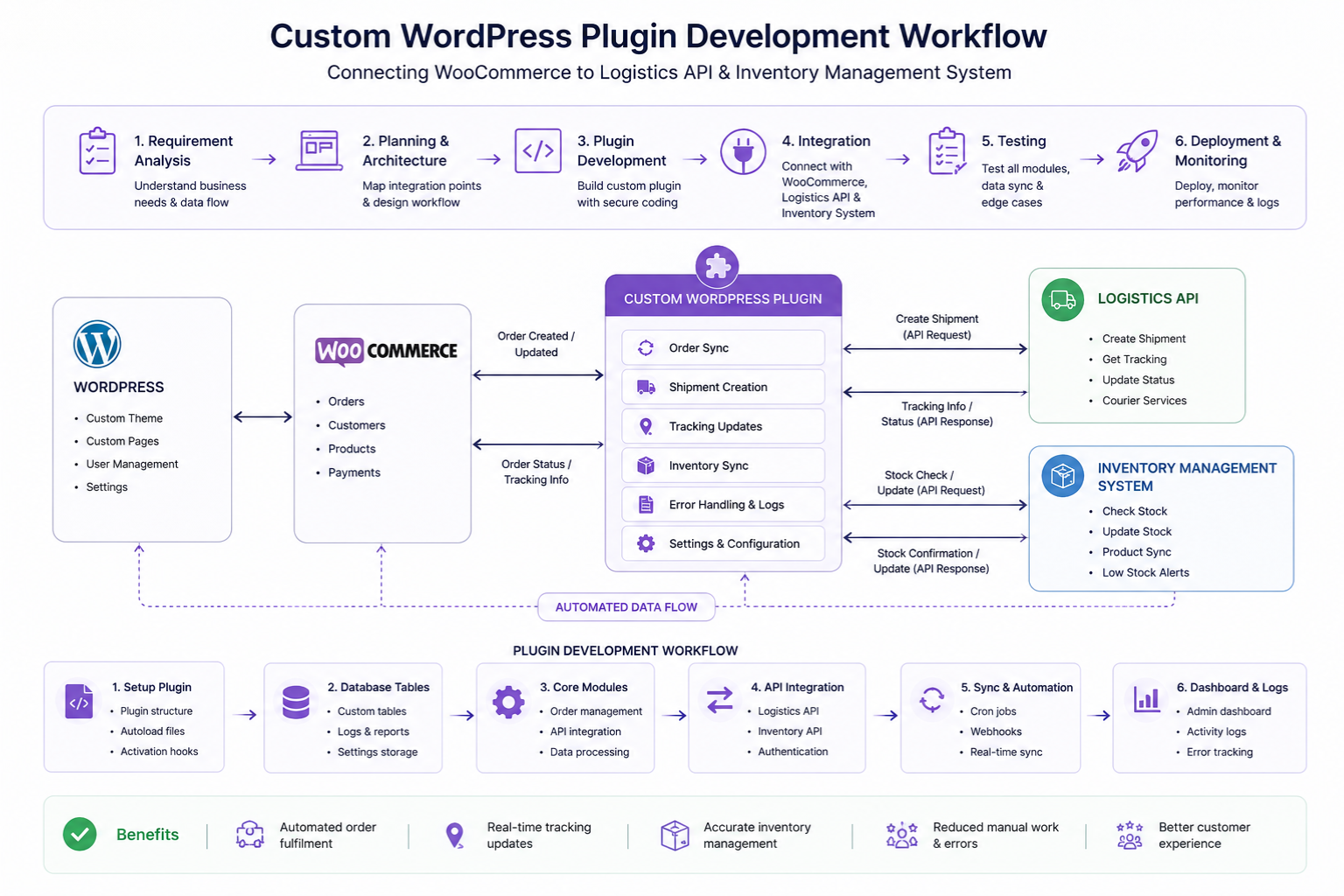
Order Capture to Logistics: The second an order comes in, your custom plugin pulls the data, formats it for your logistics partner (Delhivery, Shiprocket, Blue Dart, whoever), and creates the shipment automatically. No copy-paste. No logging into separate dashboards.
Inventory Sync: Your plugin talks to your actual inventory system. Whether that’s Tally, a custom ERP, or even Google Sheets (yes, we’ve done that for a Baner retail client who wasn’t ready for a full ERP). Stock levels update in real-time. If you have 7 units left in your Chakan warehouse, your WooCommerce store shows 7 units, not 50.
Customer Communication: Automated emails aren’t new. But smart ones are. Your plugin can send different email templates based on order value, product category, or customer type. A ₹45,000 B2B order gets a formal proforma invoice. A ₹890 retail order gets a friendly tracking update.
Payment Reconciliation: If you’re dealing with COD and prepaid orders, your plugin can automatically update order status when payment confirmation comes from your payment gateway or logistics partner’s COD remittance.
Returns and Exchanges: This is where most automation breaks down. But custom plugins development for WooCommerce can handle return requests, generate reverse pickup labels, and update inventory when returned products arrive.
Think about it this way: every decision you currently make while processing an order can be coded into a plugin. The plugin makes the same decision in 0.3 seconds instead of the 2 minutes it takes you.
The Five Order Fulfilment Tasks You Should Automate First
Don’t try to automate everything at once. You’ll get overwhelmed, your developer will give you a ₹5 lakh quote, and you’ll abandon the whole idea.
Start here:
1. Automatic Shipment Creation
This is the biggest time-saver. A real estate materials supplier in Hinjewadi was processing 40-60 orders daily. Each order needed manual entry into their Delhivery panel. We built a custom plugin that creates the shipment, generates the label, and sends tracking details to the customer automatically. Saved them 4 hours daily.
The plugin watches for new orders, checks product weight and dimensions (stored in custom fields), selects the right courier based on pincode serviceability, and pushes the order through the logistics API. Done.
2. Inventory Updates Across Systems
Your WooCommerce store thinks you have 50 units. Your warehouse has 12. Customer orders 20. Now you have an angry customer and a mess to fix.
Custom wordpress plugin development can create a two-way sync. When an order comes in, inventory decreases in both WooCommerce and your warehouse management system. When your warehouse receives new stock, it reflects on your website immediately.
We did this for a Kharadi healthcare equipment seller who was constantly overselling. Their returns dropped by 67% in two months just because inventory was finally accurate.
3. Dynamic Order Routing
If you have multiple warehouses or work with dropshipping suppliers, you need smart routing.
Here’s what a custom plugin can do: order comes in for pincode 411057 in Pune. Plugin checks inventory in your Pune warehouse first. If in stock, routes there. If not, checks Mumbai warehouse. If neither has stock, creates a purchase order with your supplier and marks the order as “processing from supplier” with an expected dispatch date.
This kind of logic isn’t available in marketplace plugins. It requires custom web application development company expertise because you’re essentially building a mini order management system.
4. Automated Documentation
GST invoices, e-way bills, packing slips, shipping labels, proforma invoices for B2B customers – these take time to generate manually.
A custom plugin can auto-generate all of these when an order is placed. Different document formats for different customer types. We built this for a manufacturing client in MIDC Bhosari who sells both B2B and B2C. B2B orders over ₹50,000 automatically get proforma invoices sent to the accounts department for approval before shipping. B2C orders under ₹5,000 skip approvals and ship immediately.
5. Customer Communication Based on Order Status
Standard WooCommerce emails are basic. “Your order is processing.” Okay, but what does that mean?
Custom plugins can send context-aware updates. “Your order is being packed at our Wakad facility and will ship by 6 PM today.” Or “Your customized product is in production, expected completion in 3 days.” Or “Your COD order requires phone verification. Please respond to the SMS sent to your number.”
A Baner furniture e-commerce client reduced “where’s my order?” calls by 78% just by sending smarter, more specific automated updates.
How to Actually Build This (Without Getting Lost in Technical Complexity)
You don’t need to understand PHP or WooCommerce hooks to get this done. But you do need to understand the process so you don’t waste money on the wrong solution.
Step 1: Map Your Current Workflow
Sit down with whoever processes orders now. Write down every single step. Every click, every copy-paste, every decision point.
“Check order details. Copy customer address. Log into Delhivery. Paste address. Select COD or prepaid. Check product weight. Select service type. Generate label. Download label. Attach to WooCommerce order. Mark order as shipped. Copy tracking number. Send email to customer.”
That’s 12 manual steps. Each one can probably be automated.
Step 2: Identify Integration Points
What external systems do you use? List them:
- Logistics partner (and their API documentation)
- Inventory system (Tally, Zoho, custom ERP, whatever)
- Accounting software
- CRM
- Payment gateway
- SMS provider
- Email marketing tool
Your custom plugin will need to talk to these systems. If they have APIs, great. If not (looking at you, old versions of Tally), you might need middleware or file-based sync.
Step 3: Define Your Automation Rules
This is where you think through the logic. Write it in plain English:
“If order value is above ₹10,000 AND customer has ordered before, ship immediately. If order value is above ₹10,000 AND customer is new, wait for payment confirmation even if they chose prepaid.”
“If product is out of stock in Pune warehouse but available in Mumbai warehouse, route to Mumbai only if customer pincode is in Mumbai/Thane/Navi Mumbai. Otherwise, mark as backorder and notify customer.”
These rules become the code that powers your automation.
Step 4: Find the Right Development Partner
Here’s what matters: experience with ecommerce website development specifically. Not just “we build websites.” You need someone who understands WooCommerce hooks, WordPress action schedulers, API integrations, and how e-commerce businesses actually work.
At Webcomp Digitex, we’ve built custom order fulfilment plugins for manufacturing, healthcare, and retail clients across Pune. Not saying you have to work with us, but work with someone who has real client examples in your industry.
Ask potential developers:
- Show me a similar plugin you’ve built. What systems did it integrate with?
- How do you handle API failures? (If they look confused, walk away)
- What happens when the logistics API is down for 2 hours?
- How will you make this maintainable when WooCommerce updates?
Step 5: Start with Phase 1, Not Everything
Build the most painful automation first. Usually that’s shipment creation and tracking. Get that working perfectly for a month. Then add inventory sync. Then documentation. Then advanced routing.
This approach costs less upfront, delivers value faster, and lets you course-correct if something doesn’t work as expected.
Real Cost and ROI (The Numbers Everyone Wants But No One Talks About)
Let’s be honest about money.
Custom plugins development for WooCommerce for basic order fulfilment automation typically ranges from ₹80,000 to ₹2,50,000 depending on complexity.
Basic automation (shipment creation, tracking updates, simple inventory sync): ₹80,000 to ₹1,20,000
Mid-level (everything above plus multi-warehouse routing, custom documentation, conditional logic): ₹1,50,000 to ₹2,00,000
Complex (ERP integration, multiple logistics partners with auto-selection, advanced B2B workflows, custom approval chains): ₹2,00,000 to ₹3,50,000+
Now the ROI:
That Pimpri-Chinchwad client I mentioned earlier spent ₹1,65,000 on their custom plugin. They were spending 41 hours monthly on order processing (their time + their team member’s time). At a blended rate of ₹500/hour in terms of what else they could be doing with that time, that’s ₹20,500 monthly. Plugin paid for itself in 8 months. They’re now processing 340 orders monthly with the same 41 hours they used to spend on 200 orders.
But here’s the bigger win: they can now take on wholesale orders without hiring more people. That’s opened up a new revenue channel worth ₹4.5 lakh monthly. The plugin didn’t just save time. It removed a growth bottleneck.
Common Mistakes That Kill Order Fulfilment Automation Projects
I’ve seen these kill projects even after development starts:
Mistake 1: Not Involving the People Who Actually Process Orders
Your developer needs to talk to the person who clicks the buttons every day, not just you. They know the edge cases. “What about orders where the customer lists a different billing and shipping state and we need to split the invoice?” Your ops person knows this. You might not.
Mistake 2: Assuming Your Current Process Is Correct
Sometimes your manual process has workarounds for problems that shouldn’t exist. “We always call the customer to confirm address because people make mistakes.” Maybe. Or maybe your checkout form is confusing and needs fixing. Don’t automate a broken process.
Mistake 3: Ignoring Error Handling
APIs fail. Internet goes down. Logistics partner’s system has maintenance. Your plugin needs to handle this gracefully. Queue the order, retry after 10 minutes, send you an alert if it fails three times. We learned this the hard way with a client whose plugin kept silently failing until they noticed 40 unshipped orders.
Mistake 4: Not Planning for Changes
Your logistics partner will update their API. You’ll add new product categories. You’ll start shipping internationally. Your plugin needs to be maintainable and extensible. Ask your developer about documentation and how future changes will be handled.
When You Actually Don’t Need Custom Development
Look, I sell custom plugins development for woocommerce services at Webcomp Digitex. But I’m not going to tell you to build custom if you don’t need it.
You probably don’t need custom development if:
- You’re processing fewer than 50 orders monthly. The time saved won’t justify the cost yet.
- Your workflow is completely standard and marketplace plugins work fine. Not everything needs to be custom.
- You’re still figuring out your business model and your workflow might change drastically in 6 months. Wait till things stabilize.
- Your logistics partner and inventory system are already integrated with WooCommerce through existing plugins and they work. Don’t fix what isn’t broken.
You definitely need custom development if:
- You’re manually processing 100+ orders monthly and it’s taking significant time
- You use systems that don’t have WooCommerce integrations (custom ERPs, specific logistics partners, Tally setups, etc.)
- You have complex B2B workflows that standard plugins can’t handle
- You’re losing sales because inventory isn’t accurate or fulfilment is too slow
- You have multiple warehouses or dropshipping arrangements that need smart routing

How to Measure If Your Automation Is Actually Working
Don’t just build it and forget it. Track these:
Average Order Processing Time: Before automation, time yourself processing 10 orders. Calculate average. After automation, check how long your plugin takes from order placement to shipment creation. We track this in Google Analytics 4 using custom events for a Kharadi electronics client. Went from 11 minutes to 52 seconds average.
Order Error Rate: How many orders have issues? Wrong address sent to logistics, incorrect product shipped, inventory oversold. This should drop significantly if your automation is working.
Customer Service Tickets: “Where’s my order?” tickets should decrease. If they’re increasing, your automated communications aren’t clear enough.
Orders Per Hour of Human Time: This is your real productivity metric. If you’re processing more orders without adding more hours, automation is working.
Set up a simple dashboard in Google Sheets or use Hotjar to track these monthly. We help clients set this up because what gets measured gets managed.
Frequently Asked Questions
Can I build this myself if I know some WordPress development?
Honestly? Maybe. If you understand WooCommerce hooks, action schedulers, and have experience with API integrations, you can build basic automation. But here’s the catch: you’ll spend 60-80 hours learning the specific APIs, testing edge cases, and debugging. If your time is worth ₹1,000/hour, that’s ₹80,000 in opportunity cost. Plus ongoing maintenance. Most business owners are better off focusing on their business and hiring experts for this. We’ve had clients come to us with half-built plugins they started themselves, and honestly, starting fresh is often cleaner than fixing partially built code.
How long does it take to develop a custom order fulfilment plugin?
For basic automation, 3-4 weeks from requirement gathering to deployment. Mid-level complexity, 6-8 weeks. Complex integrations with multiple systems, 10-14 weeks. This includes testing. The actual coding might be faster, but proper testing with real orders, handling edge cases, and making sure nothing breaks during WooCommerce updates takes time. We usually do phased rollouts – test with 10% of orders for a week, then 50%, then full deployment.
What happens when WooCommerce or WordPress updates?
This is why you need good development practices. Your plugin should follow WordPress and WooCommerce coding standards, use proper hooks instead of hacks, and be tested with beta versions of WooCommerce before major releases. At Webcomp Digitex, we offer maintenance contracts that include testing updates and fixing compatibility issues. Generally, if a plugin is built correctly, WooCommerce updates don’t break it. We’ve had plugins running for 3+ years through dozens of WooCommerce updates without issues.
Can the plugin work with any logistics partner in India?
If the logistics partner has an API and provides documentation, yes. We’ve integrated Delhivery, Shiprocket, Blue Dart, DTDC, Ecom Express, and several regional players. Some logistics companies have terrible APIs (I won’t name them, but you know who you are), which makes integration harder but not impossible. Occasionally you’ll find a logistics partner with no API at all, only manual panel entry. In those cases, we can sometimes do email-based or file-based integration, but it’s not real-time.
Will this work if I’m using custom post types or modified WooCommerce structure?
It depends on what you’ve modified. If you’re using standard WooCommerce order structure but have custom product types or custom fields, absolutely. Custom plugins can work with that. If you’ve heavily modified WooCommerce core or are using WooCommerce in unconventional ways, it gets trickier. We did a project for a Hinjewadi SaaS company using WooCommerce to sell subscriptions with custom license generation – worked fine, just needed more custom code. The key is understanding your specific setup during requirement gathering.
How do you handle data security with API integrations?
All API credentials are stored encrypted in the WordPress database. API calls use HTTPS. Sensitive customer data (phone numbers, addresses) is transmitted only to authorized systems and never logged in plain text. We follow WordPress security standards and recommend using plugins like Wordfence for additional security. For clients handling sensitive data (healthcare, finance), we implement additional security layers including API request signing, IP whitelisting, and detailed audit logs. This isn’t optional – security is built into the development process from day one.
Stop Processing Orders Manually. Let’s Automate Your WooCommerce Store.
You didn’t start your business to spend hours copying and pasting order details.
If you’re doing more than 100 orders monthly and still processing them manually, you’re losing time and money every single day.
Custom plugins development for WooCommerce isn’t about fancy technology. It’s about getting your time back. It’s about scaling without hiring three more people. It’s about not losing orders because inventory was wrong or fulfilment was too slow.
We’ve built order automation plugins for manufacturing units in MIDC, healthcare suppliers in Kharadi, retail brands in Baner, and B2B distributors across Pimpri-Chinchwad. We understand Pune businesses because we’re a Pune-based custom web application development company.
Want to see if automation makes sense for your store? Let’s talk.
Call us at +91-9960802498 or visit webcompdigitex.com. We’ll spend 30 minutes understanding your workflow and tell you honestly whether custom development will give you ROI or if there’s a simpler solution.
Webcomp Digitex – we don’t just build plugins, we solve real business problems for real Pune businesses.

