
How a B2B PPC Agency Sets Up LinkedIn Ads That Actually Generate Leads
I still remember the call from a precision engineering company in Chakan. They’d burned through ₹2.8 lakhs on LinkedIn Ads in three months with exactly seven leads to show for it. Seven. The owner was furious, and honestly, I don’t blame him.
Here’s the thing: LinkedIn Ads aren’t like Facebook or Google. The rules are different. The costs are higher. And if you set them up like you would any other platform, you’ll watch your money disappear faster than chai at a Pune winter morning meeting.
But when you get it right? We helped that same engineering company cut their cost-per-lead from ₹40,000 to ₹8,500 in five months. Same budget, completely different results.
Look, I’ve been running LinkedIn campaigns for B2B clients across Pune since 2016. Manufacturing units in Pimpri-Chinchwad, IT companies in Hinjewadi, real estate developers in Baner. And I can tell you this: most businesses approach LinkedIn Ads completely wrong from day one.
Let me walk you through exactly how we set up LinkedIn campaigns at Webcomp Digitex. Not theory. Not what some Silicon Valley guru says works. What actually works for Indian B2B companies with real budgets and real sales cycles.

Why LinkedIn Ads Are Different (And Why Most Agencies Mess Them Up)
Before we dive into setup, you need to understand something fundamental.
LinkedIn costs more. A lot more. Your cost-per-click will typically run ₹150-₹450, compared to ₹15-₹80 on Facebook. I’ve seen CPCs hit ₹600+ for competitive audiences in IT services.
But here’s what most people miss: you’re not paying for random scrollers. You’re paying to reach the production manager at that automotive company in MIDC. The CTO at that SaaS startup in Kharadi. The purchasing head who actually signs off on B2B deals.
One good lead from LinkedIn can be worth ten from Facebook. Think about it this way: would you rather have 100 leads from people who downloaded your free ebook but will never buy, or 10 leads from decision-makers actively looking for solutions?
The problem is, most B2B digital marketing agencies treat LinkedIn like a scaled-down Facebook. They target too broadly, they optimize for clicks instead of conversions, and they panic when they see the CPC numbers.
Here’s what I’ve learned after spending over ₹1.2 crores on LinkedIn Ads for clients: the platform rewards specificity and patience. Your first month will almost always look expensive. Your second month starts showing promise. By month three, if you’ve been optimizing properly, the numbers start making sense.
Step 1: Campaign Setup That Doesn’t Waste Money
Let’s start with the Campaign Manager setup. This is where most people make their first expensive mistake.
First, you need the LinkedIn Insight Tag installed on your website. Not tomorrow. Not next week. Before you spend a single rupee. Go to Campaign Manager, grab your Insight Tag, and get it installed. If you’re using Google Tag Manager, it takes literally ten minutes.
Why does this matter? Because without it, you can’t track conversions, you can’t retarget visitors, and you’re basically flying blind. I’ve seen companies spend ₹5 lakhs before realizing their tracking wasn’t working. Don’t be that company.
Now, campaign objective. Here’s where it gets real.
If you’re a B2B digital agency looking for immediate leads, choose “Lead Generation” and use LinkedIn’s native lead forms. These cost more per lead (typically ₹2,500-₹8,000) but the quality is usually better because people don’t have to leave LinkedIn.
If you’ve got a longer sales cycle or you want more control over the landing page experience, choose “Website Conversions”. Your cost per conversion will look cheaper initially (₹1,500-₹4,000) but you’ll need to nurture these leads more carefully.
What about “Website Visits”? Honestly, unless you’re running a remarketing campaign, skip it. I’ve never seen good B2B results from optimizing for traffic. You’re not running a blog here.
One thing that trips people up: LinkedIn’s campaign structure is different. You’ve got Campaign > Campaign Group > Ad. Most platforms don’t have that middle layer. Use campaign groups to test different audiences while keeping your overall objective and budget consistent.
Step 2: Audience Targeting (Where Money Gets Wasted or Made)
This is it. This is where LinkedIn Ads either print money or burn it.
Start with your dream client profile. Not “mid-sized companies” or “decision-makers”. Get specific. What job titles do they have? What companies do they work for? What skills are listed on their profiles?
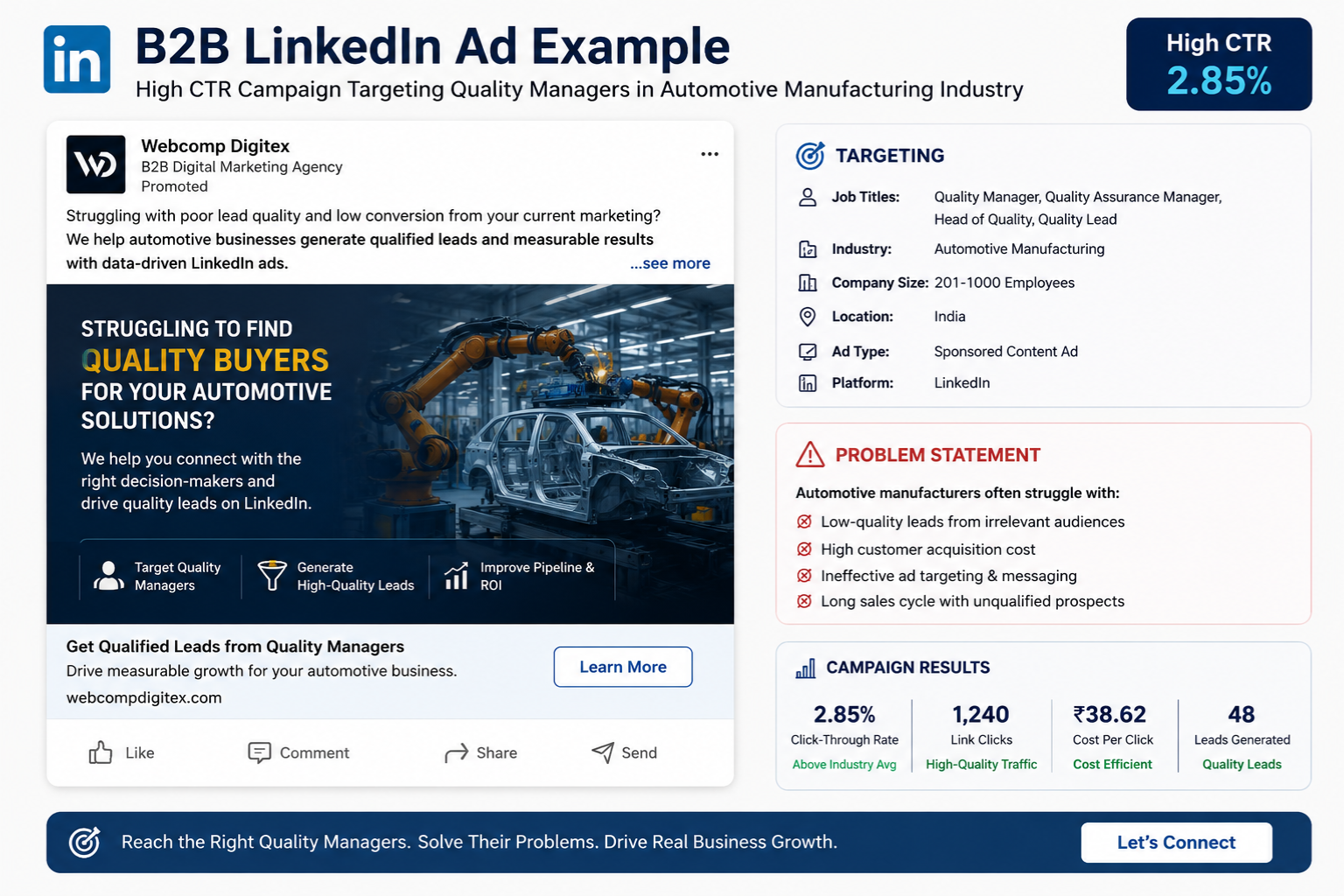
For a manufacturing client in Chakan targeting automotive component buyers, we built this audience:
- Job titles: Purchase Manager, Procurement Head, Supply Chain Manager
- Company industry: Automotive, Automotive Manufacturing
- Company size: 51-500 employees
- Location: Maharashtra, Gujarat, Tamil Nadu (their main markets)
- Seniority: Manager, Director, VP
That audience size? 28,000 people. Perfect.
Here’s the thing about audience size that nobody tells you: LinkedIn recommends 50,000+ for their algorithm to work. But I’ve run campaigns to 15,000-person audiences that crushed it, and campaigns to 200,000-person audiences that flopped.
Quality matters more than size. I’d rather reach 20,000 right people than 100,000 wrong ones.
The mistake I see constantly from B2B digital marketing agencies: they target “Marketing Manager” at “Computer Software” companies with no other filters. That’s 400,000 people in India. You know what happens? Your ads show up for a social media manager at a 10-person startup in Jaipur when you’re trying to sell enterprise software to Pune IT companies.
Use the AND/OR logic smartly. If you want purchase managers OR procurement heads (because different companies use different titles), that’s fine. But if you want them at manufacturing companies AND they have “quality management” skills, stack those filters.
Pro tip from someone who’s been doing this a while: save your audiences. When you find one that works, give it a clear name and save it. We’ve got about 40 saved audiences at Webcomp Digitex for different client types. It saves hours of setup time.
One more thing: Matched Audiences are gold for B2B. Upload your CRM list (even if it’s just 200 people), create a lookalike audience, and target them separately. We’ve seen cost-per-leads 40% lower on lookalike audiences compared to interest-based targeting.

Step 3: Budget Planning That Actually Makes Sense
Let’s talk money. Real numbers.
LinkedIn’s minimum daily budget is ₹1,000 per campaign. But here’s what I tell every client: if you’re not willing to spend at least ₹50,000 per month, LinkedIn Ads probably aren’t for you yet. Focus on organic LinkedIn first, or try Google Ads.
Why ₹50,000? Because LinkedIn’s learning phase takes time. At ₹25,000 per month, you’re getting maybe 100-150 clicks. That’s barely enough data for the algorithm to learn anything. You’ll spend three months “testing” and conclude LinkedIn doesn’t work, when really you just didn’t give it a fair shot.
Our sweet spot for most Pune B2B clients: ₹75,000-₹1.5 lakhs per month. At that level, you’re getting enough data to optimize weekly, you can test 2-3 audience segments, and you’ll typically see results by month two.
Start with manual bidding. I know, I know, LinkedIn pushes automatic bidding hard. But when you’re starting out, manual gives you control. Set your bid at the lower end of LinkedIn’s suggested range, then increase by ₹20-₹30 every few days until you’re getting consistent delivery.
Here’s something only people who actually run these campaigns know: LinkedIn’s delivery is inconsistent. Some days you’ll get 80% of your budget spent by noon. Other days you’ll hit 40% by end of day. Don’t panic and change everything on day three. Give it a week before making major bid adjustments.
For a B2B digital marketing campaign, I typically see:
- CPC: ₹200-₹400
- CTR: 0.4%-0.8%
- Conversion rate: 2%-6%
- Cost per lead: ₹3,000-₹10,000
If your CTR is below 0.3% after a week, your ad creative needs work. If your conversion rate is below 1%, your landing page is the problem, not LinkedIn.
Budget by campaign type for ₹1 lakh monthly spend:
- 60% to your best-performing audience (you’ll figure this out after month one)
- 25% to a test audience segment
- 15% to remarketing previous website visitors
Step 4: Ad Creative That Decision-Makers Actually Click
I’m going to be blunt: most LinkedIn ads are boring as hell.
“Streamline your workflow with our innovative solution.” Who clicks that? Nobody with actual budget authority, that’s for sure.
Your ad needs to do one thing: make someone think “that’s exactly my problem” in three seconds. That’s it.
For a precision engineering company targeting quality managers: “Failed supplier audit because of documentation gaps?” with an image of a rejected audit report. CTR: 1.2%.
For an IT services company targeting CTOs: “Spent 6 months hiring developers just to start from scratch?” with a simple graphic showing the hiring timeline. CTR: 0.9%.
Notice what’s missing? No corporate stock photos of people shaking hands. No buzzwords. No “leading provider” nonsense.
The format that works best for us at Webcomp Digitex: Single Image Ads with direct copy. Video ads look nice but they cost more and conversion rates are usually lower for lead gen campaigns. Carousel ads work occasionally for case studies but they’re a pain to optimize.
Ad copy structure that works:
- Hook (question or specific problem)
- One-sentence about the solution
- Specific benefit or result
- Clear CTA
Keep it under 150 characters if possible. LinkedIn truncates longer copy on mobile and that’s where 35-40% of your impressions happen.
The biggest mistake? Trying to explain everything in the ad. Your ad’s job is to get the click. Your landing page’s job is to get the conversion. Don’t confuse the two.
Test 2-3 ad variations per campaign. Same targeting, different creative. After 2,000 impressions each, pause the lowest performer and create a new test. We’re constantly rotating creative every 2-3 weeks because ad fatigue is real on LinkedIn.
Step 5: Landing Pages That Convert B2B Traffic
Your LinkedIn ad just cost you ₹300 to get someone to click. What happens next decides if that was money well spent or money wasted.
Most B2B landing pages suck. There, I said it.
They’ve got 17 different CTAs, a navigation menu, a chatbot, social media icons, and six paragraphs about company history. The visitor has no idea what they’re supposed to do.
Here’s what works for LinkedIn traffic specifically:
Remove the navigation. Yes, completely. If someone can wander off to your About page or Services section, they will. And they won’t come back to fill out your form.
Match the message exactly. If your ad said “Failed supplier audit because of documentation gaps?”, your headline better reference audits and documentation. We’ve seen conversion rates drop 60% when there’s a disconnect between ad and landing page.
Keep the form short. This depends on your sales cycle, but for most B2B services, stick to: Name, Work Email, Phone, Company Name, and one qualifying question. That’s it. Every additional field drops your conversion rate by 5-10%.
Show proof immediately. One client logo. One specific result. One testimonial. Something that says “real companies already use this” in the first screen.
For a Hinjewadi IT company selling to other tech firms, we tested two landing pages. Version A had a 7-field form. Version B had a 4-field form with identical everything else. Version B converted at 8.3%. Version A converted at 4.1%. Halved the fields, doubled the conversions.
Here’s something I’m not 100% sure everyone will agree with, but it’s been my experience: thank you pages matter more than people think. After someone submits, show them exactly what happens next. “Rajesh from our team will call you within 24 hours” converts better than “Thanks, we’ll be in touch.”
Use Google Search Console and Hotjar to see how people actually interact with your landing page. You’ll discover stuff that analytics alone won’t show you. Like that one button nobody clicks or the form field where everyone exits.
Step 6: Optimization (The Part Nobody Wants to Do But Everyone Needs To)
Optimization isn’t complicated. It’s just consistent.
Here’s my weekly routine for active LinkedIn campaigns at Webcomp Digitex:
Days 1-7: Watch but don’t touch. Let the algorithm learn. Check that tracking works and leads are flowing through. That’s it.
Week 2: Check which ads have CTR above 0.5%. Pause anything below 0.3%. Increase budget by 20% on top performer.
Week 3: Look at conversion rates. If an ad has great CTR but terrible conversion rate, the landing page message doesn’t match or the audience is wrong.
Week 4: Start testing a new audience segment at 20% of budget.
That’s the cycle. Every week, small tweaks. Not dramatic overhauls. Not complete restarts.
The metrics that actually matter:
- CTR: tells you if your ad resonates
- Conversion rate: tells you if your offer and audience are right
- Cost per lead: tells you if it’s profitable
- Lead quality: tells you if you’re targeting the right people
That last one is crucial and most agencies ignore it. Use GA4 to track what LinkedIn leads do after converting. Do they visit pricing? Do they book demos? Or do they never come back?
For a real estate client in Wakad targeting corporate buyers, we had one campaign with ₹4,200 cost-per-lead and another with ₹6,800 cost-per-lead. Everyone wanted to kill the expensive campaign. But when we tracked it through to sales, the ₹6,800 leads closed at 18% vs 7% for the cheaper leads. Suddenly that “expensive” campaign was the profitable one.
Use LinkedIn’s conversion tracking to set up multiple conversion events. We track: lead form submission, thank you page view, demo booking, and deal closed (via CRM integration). This tells you the full story.
One thing that trips people up: attribution windows. LinkedIn’s default is 30 days. But B2B sales cycles in India are often 45-90 days. Someone might see your ad today and convert two months from now. Look at view-through conversions, not just click conversions.
Common Mistakes That Cost Real Money
Let me save you the tuition fees I paid learning this stuff.
Mistake 1: Targeting too broad, too fast. Start narrow. You can always expand. But if you start with 500,000 people, you’ll never know what actually worked.
Mistake 2: Killing campaigns too early. Give it 30 days minimum. B2B decision-makers don’t impulse-click LinkedIn ads at 11 PM like consumers do on Instagram.
Mistake 3: Using the same creative as your Facebook ads. Different platform, different mindset. LinkedIn users are in work mode. Treat them that way.
Mistake 4: Not having a remarketing campaign. 97% of people won’t convert on first visit. Retarget website visitors with a different message. These campaigns typically run ₹1,500-₹3,000 cost-per-lead vs ₹5,000-₹8,000 for cold traffic.
Mistake 5: Ignoring mobile. 40% of LinkedIn usage in India happens on mobile. If your landing page loads slowly or your form is painful on mobile, you’re losing half your potential leads.
Mistake 6: Setting and forgetting. This isn’t a SIP investment. Check in weekly, optimize monthly, refresh creative quarterly.
Look, here’s my honest take after working with 50+ B2B companies in Pune: LinkedIn Ads aren’t right for everyone. If you’re selling low-ticket products, if your target audience isn’t on LinkedIn, if you need leads today (not in 60 days), it might not be your best bet.
But if you’re selling to other businesses, if your average deal size is ₹2 lakhs or more, if you need quality over quantity, LinkedIn Ads can be the best marketing channel you never knew you needed.
When to Hire a B2B PPC Agency vs. DIY
Real talk: should you run this yourself or hire an agency?
DIY makes sense if:
- You’ve got marketing bandwidth (at least 5 hours per week)
- Your monthly budget is under ₹1 lakh
- You’re willing to learn and lose some money in the learning phase
- You know your audience really well
Hire a B2B digital agency if:
- Your time is better spent closing deals, not managing ads
- Your budget is ₹1.5 lakhs+ per month
- You want results in 60 days, not 6 months
- You need someone who’s already made all the expensive mistakes
The middle ground? Hire an agency for setup and first 90 days, then decide if you want to bring it in-house or continue. That’s actually how we work with several clients at Webcomp Digitex.
But here’s what I’ll tell you straight: the worst option is half-assing it yourself, getting poor results, then concluding “LinkedIn Ads don’t work for our industry.” If you’re going to DIY, commit to learning it properly. If you’re going to hire, hire someone who actually runs B2B campaigns regularly, not a generalist agency that “also does LinkedIn.”
Frequently Asked Questions
How much budget do I really need for LinkedIn Ads to work?
Minimum ₹50,000 per month, but ₹75,000-₹1 lakh is where you’ll see consistent results. Anything less and you’re not giving the algorithm enough data to optimize. Think of it this way: at ₹300 average CPC, ₹50k gets you about 165 clicks per month. If 3% convert, that’s 5 leads. Enough to test and learn, but not enough to scale confidently until month three or four.
What’s a good cost-per-lead for B2B on LinkedIn?
Depends completely on your deal size. For enterprise software or manufacturing contracts worth ₹10-50 lakhs, ₹8,000-₹15,000 per lead is reasonable. For professional services with ₹2-5 lakh lifetime value, aim for ₹3,000-₹6,000. We’ve got clients where ₹20,000 cost-per-lead is profitable because their average deal is ₹80 lakhs. Don’t compare your CPL to someone in a different industry or deal size.
Should I use lead gen forms or send traffic to my website?
Lead gen forms give you higher conversion rates (typically 8-15% vs 2-6% for landing pages) but less control over messaging and lead quality. Use them when you need volume and your sales team is good at qualifying. Use landing page conversions when your product needs more explanation or you want to track visitor behavior. We usually start with landing pages, then test lead gen forms once we know the audience converts.
How long before I see results from LinkedIn Ads?
First leads typically come within 7-14 days. But “results” means profitable campaigns, and that takes 60-90 days for most B2B. Month one is learning. Month two is optimizing. Month three is when things click if you’ve been making smart adjustments. If you need leads next week, LinkedIn probably isn’t the right channel right now.
Can LinkedIn Ads work for manufacturing companies?
Absolutely. Some of our best results are manufacturing clients in Pimpri-Chinchwad and MIDC targeting procurement managers and quality heads. The key is getting specific with titles and industries. “Purchase Manager” + “Automotive Manufacturing” + “Maharashtra” gives you a tight, relevant audience. Don’t target “Manufacturing” broadly or you’ll reach everyone from textile to pharma with completely different needs.
Do I need different campaigns for different locations in India?
Only if your offer or messaging changes by location. For most B2B services, one campaign targeting all relevant states works fine. But if you’re a real estate developer in Pune targeting only local corporate buyers, or a manufacturer who only services Western India, definitely restrict geography. No point paying ₹400 CPC for someone in Kolkata who’ll never buy from you.
Ready to Get LinkedIn Ads Working for Your B2B Company?
Look, I’ve given you the exact process we use at Webcomp Digitex. The same steps we followed to cut that engineering company’s cost-per-lead from ₹40,000 to ₹8,500. The same targeting we use for IT companies in Hinjewadi and manufacturers in Chakan.
You can absolutely run this yourself if you’ve got the time and patience.
But if you’re like most B2B owners we work with in Pune, you’ve got enough on your plate closing deals, managing operations, and actually running your business. You don’t have time to spend 20 hours figuring out why your LinkedIn campaign is getting impressions but no clicks.
That’s kind of what we do all day. We’re a B2B PPC agency that specializes in LinkedIn Ads for manufacturing, IT, and B2B services companies across Pune and beyond. We’ve managed over ₹1.2 crores in LinkedIn Ad spend. We know what works and what burns money.
If you’re spending ₹75,000+ per month on LinkedIn Ads (or planning to), let’s talk. We’ll look at what you’re doing now, show you exactly where money is getting wasted, and give you a straight answer on whether we can help.
Call us at +91-9960802498 or check out what we do at webcompdigitex.com. We’re based in Pune, we work with real B2B companies, and we only take on clients we’re confident we can get results for.
Let’s turn those LinkedIn Ads into actual leads that actually close.


