How a Web Application Development Agency Builds Multilingual Websites That Actually Work
Here’s something that happened last month at our office in Pune.
A real estate developer from Baner came in frustrated. They’d spent ₹4.8 lakhs on a beautiful new website. English content was polished. Design was clean. But here’s the thing — 67% of their actual buyers preferred communicating in Marathi. The website? English only.
They were losing leads not because their properties weren’t good, but because their website didn’t speak their customers’ language. Literally.
And honestly? This happens more than you’d think.
India has 22 official languages and hundreds of dialects. Your potential customers in Pimpri-Chinchwad might prefer Marathi. The ones in Kharadi might be comfortable with English. Some manufacturing buyers from smaller towns around MIDC Bhosari want Hindi. If your website only speaks one language, you’re leaving money on the table.
But here’s what most people don’t realize — multilingual website development isn’t just about translating text. It’s about building a web application that handles multiple languages technically, ranks well in each language (that’s the international SEO part), and actually converts users who think differently, search differently, and buy differently in each language.
I’ve been working with a web and app development company here in Pune for over 12 years, and I’ve seen businesses transform their reach by going multilingual. I’ve also seen expensive mistakes that could’ve been avoided.
Let me walk you through exactly how to do this right.

Step 1: Figure Out Which Languages Actually Matter for Your Business
Don’t just guess. Look at your data first.
Open Google Analytics 4 (if you’re still on Universal Analytics, we need to talk — that ship has sailed). Go to Reports → User → Demographics → Language. This shows you what language settings your current visitors have on their browsers.
But that’s just the starting point. Here’s what most people miss — your current traffic might not represent your actual market. If your site is English-only right now, you’re only seeing English-comfortable users. The bigger market might be invisible to you.
So do this instead:
Talk to your sales team. Seriously. Sit down with whoever actually closes deals. What language do customers prefer on calls? What language do they write emails in? When they visit your office, what do they speak?
We worked with a manufacturing client in Chakan — precision auto components. Their website traffic was 80% English according to GA4. But their sales team said 60% of serious inquiries came from buyers who were more comfortable in Hindi or Marathi. We rebuilt their site with those three languages. Cost-per-lead dropped from ₹6,400 to ₹1,900 in four months. Not because we changed their offering. Because we made it easier for their real audience to understand what they do.
Check your competitors. Use Ahrefs or SEMrush to see what languages your successful competitors are targeting. Put in their domain, go to Organic Search, filter by country and language. If three of your main competitors are ranking for Hindi keywords, that’s telling you something.
Look at search volume by language. Use Google Keyword Planner. Search your main service keywords in different languages. A healthcare client in Kothrud found that “स्त्रीरोग तज्ञ पुणे” (gynecologist Pune in Marathi) had 2,100 monthly searches while the English version had only 1,300. Guess which language we prioritized?
Here’s the practical action for this step: Make a spreadsheet. Column 1: Language. Column 2: Evidence (what data suggests this matters). Column 3: Priority (high/medium/low). Don’t target more than 3-4 languages to start. You can always add more later.
What trips people up here: They choose languages based on what feels right instead of what the data says. Your gut might say Hindi because it’s widely spoken. But if your actual customers in Pune prefer Marathi and English, start there.
Step 2: Decide Your URL Structure (This Affects Everything Later)
This is where I see businesses make expensive mistakes. How you structure your URLs impacts your international SEO, your development complexity, and your ability to track performance in each language.
You’ve got three main options:
Option 1: Subdirectories — yoursite.com/en/, yoursite.com/mr/, yoursite.com/hi/
This is what we recommend for most Indian businesses at Webcomp Digitex. It’s clean, keeps everything under one domain (good for SEO authority), and it’s easiest to manage. Plus, Google Search Console handles it well.
Option 2: Subdomains — en.yoursite.com, mr.yoursite.com, hi.yoursite.com
This works if you’re treating each language as almost a separate business. The technical setup is more complex. Each subdomain is treated separately by Google, which means your SEO efforts are split. Generally harder to maintain.
Option 3: Separate domains — yoursite.com, yoursite.in, yoursite.mr
Only makes sense if you’re targeting completely different countries with different business operations. For most Indian businesses serving a local audience, this is overkill and expensive.
Go with subdirectories unless you have a specific reason not to.
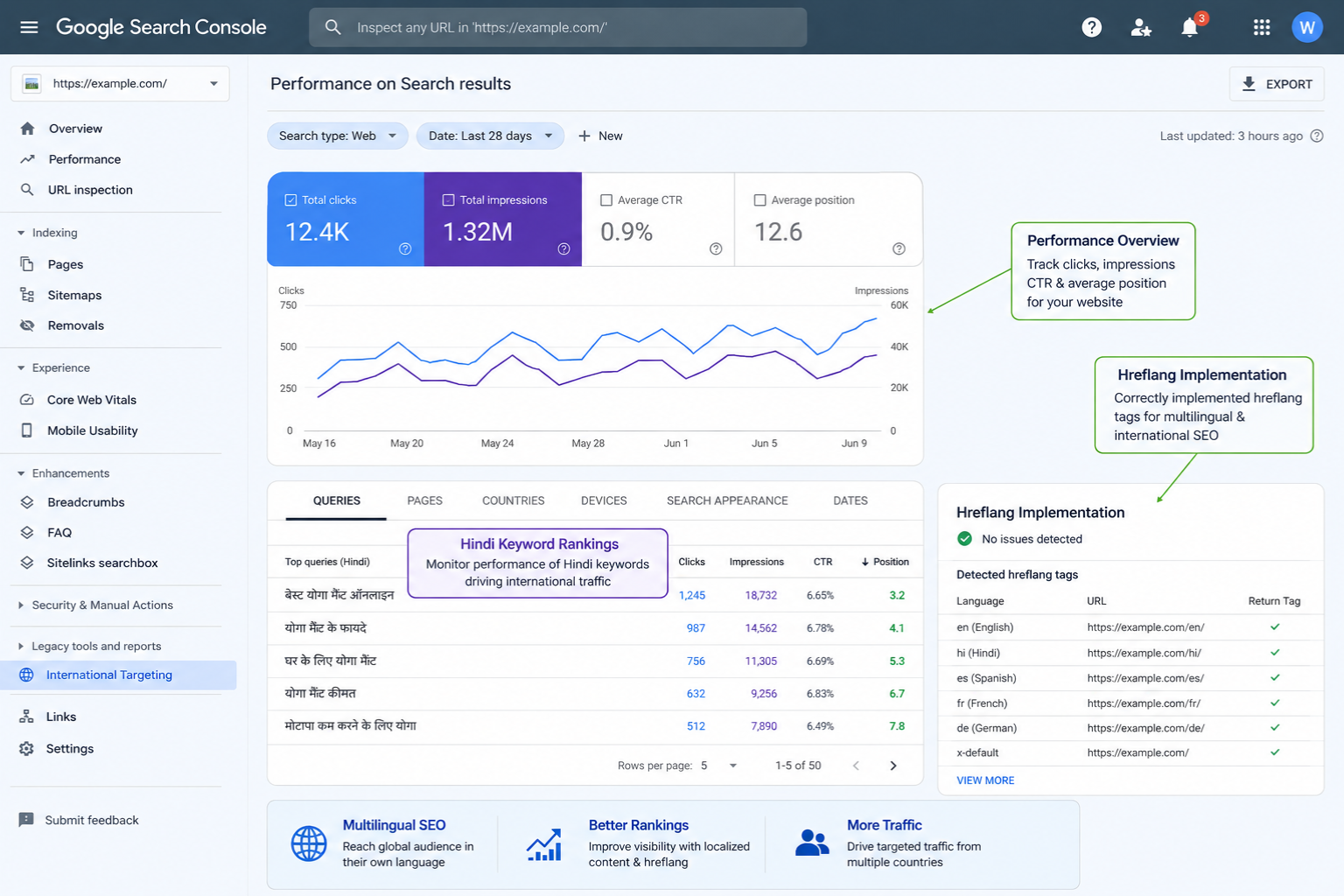
Here’s something only someone who’s actually built these sites knows — you need to set hreflang tags correctly no matter which structure you choose. These are HTML tags that tell Google which language version of a page to show to which users. Get these wrong, and Google might show your Hindi page to English searchers or vice versa.
Your developer needs to implement this. It looks like this in the code:
“`
“`
Every page needs these tags pointing to its language alternatives.
What to do this week: Decide your URL structure now. Write it down. Share it with your web application development agency or developer before they start building anything. Changing this later means redirects, broken links, and lost SEO value.
What trips people up here: They let the developer decide this based on what’s technically easiest, not what’s best for SEO and users. Have this conversation upfront.
Step 3: Build the Technical Foundation Right (Your CMS Choice Matters)
You need a content management system that actually handles multiple languages without making your life hell.
If you’re building a new site, here’s what works:
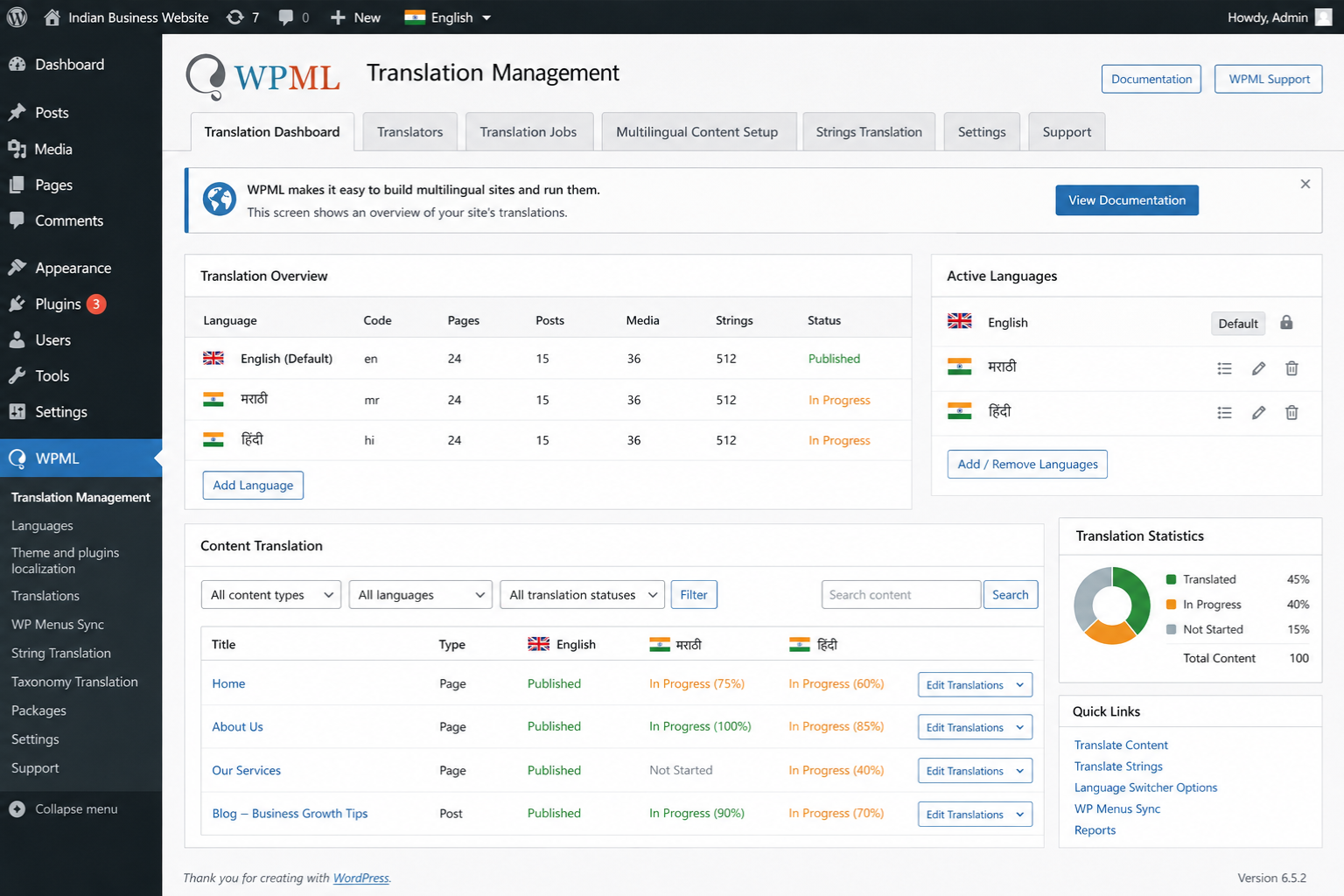
WordPress with WPML or Polylang: Most flexible for small to medium businesses. WPML is more powerful but costs around $99/year. Polylang is free for basic features. Both let you manage translations, handle hreflang automatically, and create language-specific menus and widgets.
Webflow with Weglot: If you want a more modern, design-focused build. Weglot integrates smoothly and handles translation management. Starts at around $15/month for small sites.
Custom development with Next.js or React: This is what we build at Webcomp Digitex for larger applications that need more control. Uses libraries like next-i18next or react-intl. More expensive upfront but gives you complete control over performance and features.
Here’s what you need technically, regardless of platform:
Language switcher that’s obvious: Put it in your header. Use flags if you want, but also show language names. Don’t make people hunt for it.
Language-specific forms: Your contact form should send you emails tagged with which language the user was viewing. We built this for a real estate client in Wakad — they could immediately respond in the right language, which dramatically improved their response rate.
Separate meta titles and descriptions per language: Don’t just translate word-for-word. Each language version needs its own keyword research and optimization.
RTL support if you’re including Urdu or Arabic: Right-to-left languages need special CSS. Your layout needs to flip.
Character encoding that supports Indian languages: UTF-8 is standard, but make sure your developer confirms this. I’ve seen sites where Marathi characters showed up as boxes because encoding was set wrong.
Here’s a practitioner insight most agencies won’t tell you — use a translation management system from day one, even if you’re starting with just two languages. We use Lokalise or Phrase. It tracks what’s been translated, what’s changed, and makes it easy to work with translators without giving them WordPress access.
What to do this week: If you’re working with a web and app development company, ask them specifically: “What CMS do you recommend for multilingual, and how will you handle hreflang tags and language-specific SEO?” If they don’t have a clear answer, that’s a red flag.
What trips people up here: They add a Google Translate plugin and call it done. Automatic translation is garbage for business websites. It misses context, gets technical terms wrong, and makes you look unprofessional. Always use human translators who understand your business.
Step 4: Get Your Content Actually Translated (Not Just Converted)
Translation and localization aren’t the same thing.
Translation is converting words from one language to another. Localization is adapting your message to make sense in that cultural and linguistic context.
You need localization.
Example: A manufacturing company in Hinjewadi wanted to translate “We deliver precision components with quick turnaround.” Word-for-word Hindi translation sounded stiff and formal. We worked with a translator who understood B2B manufacturing. They adjusted it to emphasize reliability and trust — concepts that resonate more in Hindi business communication. Inquiry rate from Hindi pages went up 34%.
How to actually do this:
Don’t use Google Translate. Just don’t. It’s fine for getting the gist of something, but it makes your business look amateur.
Option 1: Hire professional translators. Use platforms like Upwork or Truelancer. Look for translators who’ve worked in your industry. A healthcare translator understands medical terminology. A legal translator knows how to handle compliance language. Budget around ₹0.50 to ₹2 per word depending on language pair and expertise.
Option 2: Work with a translation agency. More expensive but they handle project management. Good if you have a lot of content. Expect to pay ₹2-4 per word.
Option 3: Internal team members who speak the language. This works if you have someone who’s actually fluent and can write well, not just speak conversationally. I’ve seen businesses use team members who speak the language at home but can’t write professionally. The content ends up awkward.
Here’s what we do at Webcomp Digitex: We have a network of translators for different industries. But we also have a review step where a native speaker from your industry reads through everything. Catches mistakes the translator might miss because they don’t know your specific business context.
What to translate first:
- Homepage
- Main service/product pages
- Contact page and forms
- Top 5 blog posts by traffic (check GA4)
- FAQs if you have them
Don’t translate everything at once. Start with pages that drive the most conversions in English, translate those, measure results, then expand.
What trips people up here: They translate everything literally, including idioms and cultural references that don’t make sense. “We’ll knock your socks off” doesn’t translate meaningfully into Hindi. Your translator should rewrite it in a way that conveys the same excitement in that language.
Step 5: Do International SEO Right for Each Language
This is where most multilingual sites fail. They translate the content but forget that SEO isn’t just about language — it’s about how people search in that language.
Keyword research per language is not optional.
Take “website design” — in English, people might search “website design company Pune” or “best web designers in Pune.” In Marathi, it’s “पुणे वेबसाइट डिझाइन” or “वेब डिझाइनिंग कंपनी पुणे.” But more importantly, searcher intent might be different. Hindi searchers in our experience often use more question-based queries.
Use these tools:
Google Keyword Planner: Set language to Hindi/Marathi/whatever you’re targeting. Set location to India or specific cities. Search your main keywords. See what related terms come up.
Google Search Console: Once your multilingual site is live, filter by page (so you’re seeing just Hindi pages) and look at what queries are actually bringing traffic. This shows you real search behavior.
SEMrush or Ahrefs: Put in your domain, filter by language, see what you’re ranking for and what competitors rank for.
Here’s something I learned after building 50+ multilingual sites — search volume data for non-English Indian languages is often incomplete in these tools. So also do this: Type your keywords into Google in an incognito window with language settings changed. Look at what autocomplete suggests. Those are real searches people are making.
On-page SEO for each language version:
- Unique meta title and description (not just translated — optimized for how people search in that language)
- H1, H2 tags with relevant keywords in that language
- URL slug in that language if it makes sense (like /mr/amchyabaddal instead of /mr/about)
- Alt text for images in that language
- Internal linking between pages in the same language
Technical SEO checklist:
- Hreflang tags implemented correctly (I mentioned this earlier — it’s that important)
- XML sitemap includes all language versions
- Google Search Console set up with language filters so you can track each version separately
- Page speed optimized (Indian languages often use web fonts — make sure these load fast)
What trips people up here: They think translation is enough. They don’t realize that someone searching in Hindi might use completely different words and phrases than the direct Hindi translation of English keywords. Do the research per language.
Step 6: Test with Real Users Before You Launch
You’ve built the site, got it translated, set up the technical SEO. Before you launch, test it with actual speakers of each language.
Not just “does this make sense?” testing. Real usability testing.
Find 2-3 people who prefer each language you’ve added. Not your bilingual office manager who speaks perfect English and Marathi. Find people who actually use that language as their primary language and aren’t super comfortable in English.
Give them specific tasks:
- Find our phone number
- Fill out the contact form
- Navigate to our services page
- Read a product description and tell me what you’d do next
Watch where they hesitate. Where they click the wrong thing. Where they look confused.
We did this for a healthcare client in Kothrud. Their Marathi translation was technically correct, but users kept getting confused by the navigation menu. Turned out the translator used formal, textbook Marathi. Users expected more conversational terms. We adjusted it based on user feedback. Form completion rate went up 28%.
Use Hotjar or Microsoft Clarity (both have free tiers) to record user sessions once you’re live. Filter by language (you can do this using custom URL tracking). Watch recordings of users navigating your Hindi pages vs. your Marathi pages. You’ll catch things you never noticed.
What trips people up here: They only test with bilingual team members who can easily switch between languages. These people aren’t your target audience. Test with actual primary speakers of each language.
Step 7: Launch in Phases and Measure Everything
Don’t flip the switch on all languages at once. Launch one language, measure results for 2-4 weeks, fix issues, then add the next.
Set up tracking properly in GA4:
Create separate events for form submissions in each language. Tag conversions by language. Set up a custom dimension for language if your setup doesn’t automatically track it. This way you can answer: “What’s our cost-per-lead in Hindi vs. English?”
Track these metrics per language:
- Traffic by language
- Bounce rate by language
- Time on page by language
- Conversion rate by language (this is the big one)
- Top landing pages per language
- Search queries per language (from Google Search Console)
We worked with an e-commerce client in Kharadi selling traditional clothing. Their English site converted at 1.8%. Added Hindi and Marathi. Marathi converted at 3.2%. Hindi at 2.1%. Same products, different languages, very different results. They shifted ad spend to focus more on Marathi. Revenue went up 43% in six months.
Monitor Google Search Console for each language version. Look for:
- Indexing issues (are all your Hindi pages actually getting indexed?)
- Crawl errors
- What keywords you’re ranking for
- Average position by query
What to do this week: Set up a simple dashboard (Google Sheets is fine) where you track key metrics per language. Update it weekly. Share it with your team. Make decisions based on what’s actually working.
What trips people up here: They launch everything, never look at language-specific data, and have no idea which languages are actually driving business. Measure separately or you’re flying blind.
When to Actually Hire a Web Application Development Agency
Look, you can technically do some of this yourself if you’re using WordPress with a plugin. But here’s when you really need professional help:
You need custom functionality per language. Like different product catalogs, different payment methods, or different user flows depending on language.
Your site is complex. If you have user accounts, search functionality, dynamic content, or integration with other systems (CRM, ERP, booking systems), don’t DIY this. The technical complexity of making all that work smoothly across languages needs experienced developers.
You want it done right the first time. Fixing a poorly built multilingual site later is more expensive than building it right initially. Trust me on this — we’ve rescued enough botched projects to know.
You don’t have time to manage it. Building a properly localized multilingual site isn’t a weekend project. If you need to stay focused on running your business, hire people who do this full-time.
At Webcomp Digitex, we’ve built multilingual websites for manufacturing companies in Pimpri-Chinchwad, real estate developers in Baner, healthcare providers across Pune, and e-commerce businesses shipping all over India. The common thread with successful projects? The business owner knew their market, we knew the technical execution, and we worked together on strategy.
Frequently Asked Questions
How much does multilingual website development actually cost in Pune?
It depends on complexity, but here’s realistic budgeting: Basic WordPress site with 2-3 languages using WPML and professional translation runs ₹80,000 to ₹2,50,000. Custom web application with multiple languages and complex functionality starts around ₹3,50,000 and goes up from there. Translation costs typically add ₹30,000 to ₹1,50,000 depending on how much content you have. Don’t forget ongoing costs — you’ll need to translate new content as you add it.
Should I use automatic translation tools to save money?
No. Just no. Automatic translation has gotten better, but it still makes embarrassing mistakes, especially with business terminology and cultural context. I’ve seen auto-translated sites that were technically correct but sounded so weird that visitors immediately bounced. Use human translators who understand your industry. It’s worth the investment. Think of it this way — you wouldn’t use an auto-generated logo for your brand. Why would you use auto-generated content that represents your business to potential customers?
How long does it take to build a multilingual website?
For a standard business website with 15-20 pages, plan on 8-12 weeks from start to launch if you’re adding 2-3 languages. That includes design, development, translation, review, and testing. Custom web applications take longer — 3-6 months typically. The translation process itself isn’t usually the bottleneck. It’s the back-and-forth review, the technical implementation of language switching, and proper testing that takes time. Rush it and you’ll end up with mistakes that hurt your credibility.
Do multilingual websites rank better in search engines?
Not automatically. But they let you rank for keywords in multiple languages, which expands your potential search visibility. If you’re only in English, you can’t rank for Hindi or Marathi searches. Add those languages with proper international SEO, and you’re now competing in additional search landscapes. That said, a poorly executed multilingual site with bad translations and technical issues can actually hurt your SEO. Do it right or don’t do it at all.
Which Indian languages should I prioritize for my business website?
This depends entirely on your audience, not general statistics about speakers. Look at your customer data first — what languages do your actual buyers use? For Pune-based businesses, English, Hindi, and Marathi are common. But if you’re serving a specific community, that changes everything. A client of ours in the diamond business added Gujarati because many of their buyers preferred it. Another client in IT staffing only needed English and Hindi. Start with 2-3 languages maximum, measure results, then expand if it makes sense.
How do I maintain a multilingual website after launch?
Budget for ongoing translation costs — every blog post, product update, or new page needs translation. Set up a workflow: content gets created in your primary language, then goes to translation, then gets reviewed, then gets published. Use a translation management system to track what’s translated and what’s pending. Schedule quarterly reviews of each language version with native speakers to catch outdated content or errors. Also keep an eye on technical stuff — plugin updates, security patches, performance optimization across all language versions.
Ready to Reach Your Full Audience? Let’s Talk
Building a multilingual website that actually works isn’t about throwing some translated text on your existing site. It’s about understanding different audiences, building the technical foundation right, and optimizing for how people actually search and behave in different languages.
Most businesses in Pune are leaving money on the table because their website only speaks one language while their actual market speaks three or four.
If you’re serious about reaching India’s diverse audience — whether that’s local customers in Pimpri-Chinchwad who prefer Marathi, Hindi-speaking buyers from other states, or anyone in between — you need a web application development agency that’s actually built these systems before and measured the results.
At Webcomp Digitex, we’ve been building multilingual websites and web applications for Indian businesses for over 12 years. We’re based right here in Pune, we understand local markets, and we know the technical and strategic side of multilingual website development.
We don’t just translate your site. We help you figure out which languages matter for your business, build the technical foundation right, handle international SEO properly, and measure what’s actually driving results.
Want to talk about how a multilingual website could work for your business? Call us at +91-9960802498 or visit webcompdigitex.com. Let’s figure out if going multilingual makes sense for you, which languages to prioritize, and what kind of results you can realistically expect.
We’ll talk about your specific business, your audience, and give you a straight answer about whether this is the right move right now. No sales pressure, just practical advice from people who’ve done this dozens of times.

