
We rebuilt a real estate website last year. Beautiful design. Great content. Conversion rate sat at 1.2 percent for six months straight.
The issue wasn’t the messaging. It wasn’t the leads. The site took 7.4 seconds to show anything meaningful on mobile. Buyers left before they ever saw the property listings. That’s not a marketing problem — that’s a Core Web Vitals problem, and most businesses don’t realize they have it until they check Google Search Console and see the red warnings staring back at them.
Core Web Vitals optimization isn’t about making your site “technically perfect.” It’s about stopping revenue leaks you didn’t know existed. Google measures three specific things: how fast your largest content loads, how quickly users can interact with your page, and whether elements jump around while loading. These metrics — LCP, FID, and CLS — directly affect where you show up in search results and whether visitors stick around long enough to become customers.
Here’s what actually moves the needle, based on fixing these issues across manufacturing sites, healthcare portals, and e-commerce platforms that needed results, not theory.
What Core Web Vitals Actually Measure and Why Business Owners Should Care
Largest Contentful Paint measures loading performance. It tracks how long before the biggest visible element appears on screen — your hero image, your main headline, the thing people came to see. Google wants this under 2.5 seconds. Most business websites we audit? They’re sitting at 4 to 6 seconds on mobile.
First Input Delay measures interactivity. How long between when someone clicks a button and when something actually happens. Google wants under 100 milliseconds. Anything over 300 milliseconds feels broken to users, even if they can’t articulate why they bounced.
Cumulative Layout Shift measures visual stability. Ever tried to click a button and the page shifted right before you tapped, making you hit the wrong thing? That’s layout shift. Google scores this — anything above 0.1 is problematic, above 0.25 is terrible.
These aren’t abstract developer concerns. A manufacturing client in Pune lost 23 qualified leads in one month because their mobile site had an LCP of 5.8 seconds and a CLS score of 0.41. Users couldn’t navigate product categories without elements jumping. They didn’t fill out the contact form — they left and called the competitor whose site actually worked.
We thought the issue was traffic quality. It wasn’t. The site experience was killing conversions before marketing ever had a chance to work. That’s the difference between treating Core Web Vitals optimization as a technical checkbox and understanding it as a conversion system issue.
Most Websites Fail LCP Because of Image Weight and Server Response Time
Largest Contentful Paint fails for two reasons that show up in almost every audit: images that weigh more than they should, and servers that respond slower than users will tolerate.
The typical business website loads a 2.3 MB hero image at full desktop resolution, even on mobile. Nobody needs that. A 1920px wide image, compressed to WebP format at 80 percent quality, usually comes in around 180 KB and looks identical to users. That’s a 92 percent file size reduction — and LCP drops from 6 seconds to 2.1 seconds with that change alone.
But image compression is only half the problem. Server response time matters more than most businesses realize. If your Time to First Byte (TTFB) sits above 600 milliseconds, you’re starting from behind. We moved a healthcare website from shared hosting to a managed WordPress host with server-level caching. TTFB dropped from 1.2 seconds to 340 milliseconds. That single infrastructure change improved LCP by 1.7 seconds.
Here’s what actually works for LCP improvement:
Compress images using tools like Squoosh or ShortPixel before uploading. Serve them in next-gen formats — WebP or AVIF. Use lazy loading for images below the fold, but never for your hero image. That defeats the purpose.
Implement a content delivery network. Cloudflare’s free tier works for most business sites. It caches static assets closer to users geographically, cutting load time by 30 to 40 percent for international traffic.
Preload your LCP element. Add “ in your page head. This tells the browser to prioritize loading that specific asset before anything else. We’ve seen LCP improvements of 0.8 to 1.3 seconds from this single line of code.
Upgrade your hosting if you’re still on basic shared plans. Businesses spending ₹300 per month on hosting and ₹50,000 on Google Ads make no sense. The hosting bottleneck kills the ad spend ROI. Managed hosting costs ₹800 to ₹2,000 monthly and fixes server response issues that shared hosting can’t solve.
One plotting project client in Pimple Saudagar saw their mobile LCP drop from 5.1 seconds to 2.3 seconds by compressing images, enabling Cloudflare, and preloading their site logo and hero section. Organic traffic increased 31 percent in eight weeks — not because we changed the SEO strategy, but because Google started ranking pages that actually passed Core Web Vitals thresholds.
FID Problems Come From JavaScript Bloat and Third-Party Scripts
First Input Delay measures how long before your site responds to user interaction. Click a menu. Tap a button. Submit a form. If nothing happens for 400 milliseconds, users assume the site is broken.
The culprit is almost always JavaScript. Specifically, render-blocking JavaScript that loads before users can interact with anything. Every analytics tag, every chat widget, every social media pixel adds JavaScript that delays interactivity.
A manufacturing client had 14 third-party scripts loading on every page. Google Analytics. Meta Pixel. LinkedIn Insight Tag. Hotjar. Two different chat widgets because marketing and sales each installed their own. HubSpot tracking. A pop-up tool. A review widget. All of them executed before the page became interactive, resulting in an FID of 520 milliseconds — well into Google’s “poor” range.
We cut it to five scripts. Consolidated tracking into Google Tag Manager. Removed the duplicate chat widget. Delayed non-essential scripts using `async` and `defer` attributes. FID dropped to 87 milliseconds. The site felt faster because it actually was faster.
Here’s the pattern that works:
Audit what’s actually loading using Chrome DevTools or GTmetrix. Look at the Coverage tab — it shows how much JavaScript loads but never executes. Anything under 50 percent usage is waste.
Defer non-critical JavaScript. If it’s not needed for initial page render — analytics, social widgets, chatbots — delay it. Add `defer` to your script tags or load them after the page finishes rendering using window.onload events.
Remove scripts you don’t actively use. Half the businesses we audit have tracking codes for tools they stopped using in 2024. Every script adds weight. Remove anything that doesn’t actively drive decisions or revenue.
Use facade techniques for embedded content. Instead of loading a full YouTube embed with 800 KB of JavaScript, show a thumbnail image that loads the real video only when clicked. Same user experience, 85 percent less JavaScript on initial load.
Switch to lighter alternatives where possible. A full HubSpot embed might load 600 KB of JavaScript. A simple form using native HTML and a lightweight validation script might load 18 KB. The conversion rate difference? Usually zero. The FID difference? Massive.
At Webcomp Digitex, we rebuild sites with performance built in from day one. That means questioning every script, every plugin, every piece of code that wants to load before users can interact. Most businesses don’t realize their “essential” tools are costing them 200 milliseconds of interaction delay and 15 percent of their mobile conversions.
CLS Issues Come From Ads, Fonts, and Images Without Defined Dimensions
Cumulative Layout Shift is the most annoying Core Web Vitals metric to fix because it shows up inconsistently. Your desktop site scores 0.02. Mobile scores 0.38. You check on different devices and get different results every time.
The usual suspects: images and videos loading without defined width and height attributes, web fonts loading and causing text to shift, dynamically injected ads or pop-ups pushing content down, embeds like Twitter cards or Instagram posts that resize after loading.
A real estate client had a CLS score of 0.47 — catastrophic by Google’s standards. The issue wasn’t complicated. They embedded property videos using iframes without specifying dimensions. The video containers started at 0 pixels tall, then jumped to 400 pixels once the video loaded. Every page load caused visible content shift that frustrated users and tanked Core Web Vitals scores.
The fix took 40 minutes. We added explicit width and height attributes to every image and iframe. Set aspect-ratio CSS properties for videos so the browser reserved space before content loaded. Preloaded the custom font file they used for headlines so text didn’t shift when the font rendered. CLS dropped to 0.06 — well within Google’s “good” threshold.
Here’s what actually solves layout shift:
Define dimensions for every image and video. Add width and height attributes in your HTML. Even if CSS resizes them responsively, the browser uses those dimensions to reserve space before the asset loads.
Use font-display: swap carefully. It prevents invisible text while fonts load, but causes layout shift when the font finally renders. Better approach: preload critical fonts using “ and use system fonts as fallbacks that match your custom font’s dimensions.
Reserve space for ads and dynamic content. If you’re running banner ads or injecting content with JavaScript, define the container height ahead of time. An empty 250-pixel container looks better than content that jumps down 250 pixels after the page loads.
Load pop-ups after user interaction, not on page load. A pop-up that appears three seconds after landing pushes content down and wrecks CLS. Trigger it after scroll depth or time on page instead — better user experience, zero layout shift penalty.
Test on real devices, not just desktop Chrome. Most CLS issues show up on mobile where connection speeds vary and content loads unpredictably. Use Google’s PageSpeed Insights and Search Console to see real-world CLS data from actual users, not just lab tests.
One e-commerce client reduced mobile CLS from 0.29 to 0.04 by fixing image dimensions and removing an auto-playing carousel that shifted content during load. Bounce rate dropped from 67 percent to 49 percent. Same traffic. Same products. The site just stopped annoying people who landed on it.

The Comparison Nobody Talks About: Lab Data vs Field Data
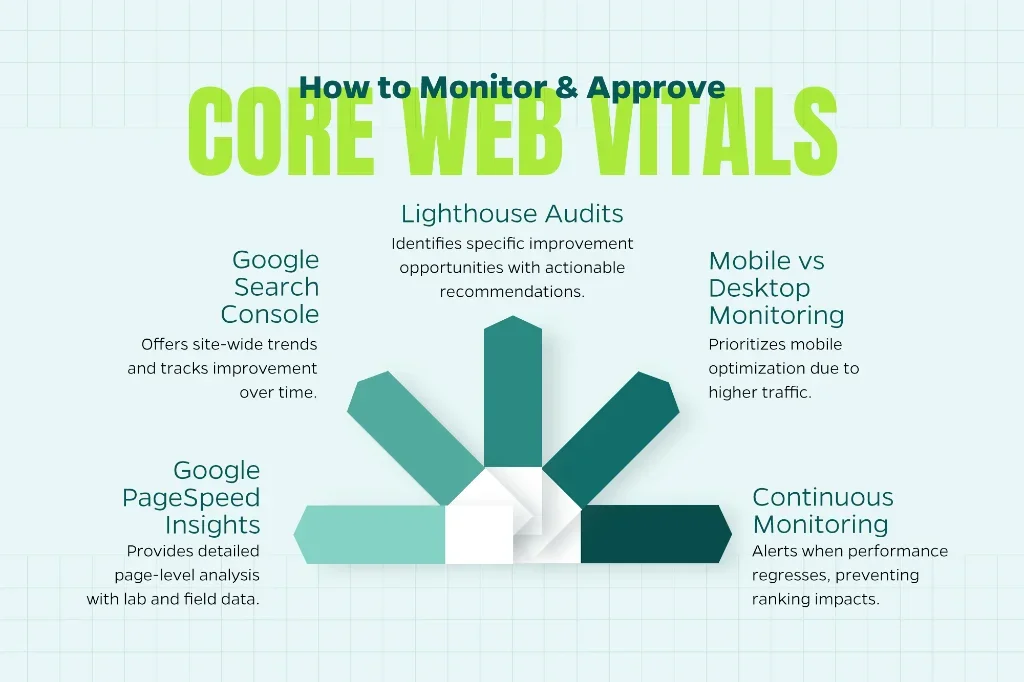
PageSpeed Insights shows two scores for Core Web Vitals — lab data and field data. Most businesses obsess over the wrong one.
Lab data is what happens when Google’s bot tests your site under controlled conditions. Fast connection. No ads. No third-party scripts sometimes. It’s useful for diagnosing specific issues but doesn’t reflect real user experience.
Field data is what actually matters. It’s called Core Web Vitals because Google measures what real users experience over 28 days using Chrome User Experience Report data. You can score 95 in lab tests and still fail Core Web Vitals if real users on slow mobile connections have poor experiences.
We rebuilt a healthcare website that scored 88 on PageSpeed Insights — green across the board. But Search Console showed 63 percent of mobile URLs failing Core Web Vitals. Why? The lab test didn’t account for the third-party prescription widget that loaded slowly for real users. The analytics tools that only fired for actual visitors. The chatbot that appeared after five seconds on real traffic but didn’t trigger in bot tests.
The field data was the truth. Lab data was optimistic.
Here’s the approach that works:
Check Google Search Console first, not PageSpeed Insights. Search Console shows field data — real users, real devices, real connections. That’s what affects rankings. If Search Console says you’re failing Core Web Vitals, you’re failing, regardless of what lab tests say.
Use PageSpeed Insights to diagnose, not to celebrate. A good lab score helps you identify what’s working. But if field data contradicts it, trust field data. Fix issues that show up in real user experience, not simulated tests.
Test on actual mobile devices using your real mobile connection — not WiFi, not desktop Chrome’s mobile emulator. Load your site on a ₹12,000 Android phone using 4G in Pune traffic. That’s your real user experience. If it’s frustrating for you, it’s frustrating for customers.
Monitor Core Web Vitals monthly. These metrics change as you add content, update plugins, or install new tracking scripts. A site that passed in January can fail by March if you’re not paying attention. Set up Search Console alerts and check the Core Web Vitals report at least once monthly.
Real-world data beats simulated tests every time. Most businesses optimize for the wrong metric and wonder why rankings don’t improve. At Webcomp Digitex, we track field data because that’s what Google ranks, that’s what users experience, and that’s what drives actual business outcomes.
What Actually Drives Core Web Vitals Improvement: Hosting, Caching, and Code Efficiency
Most businesses try to fix Core Web Vitals with plugins and quick hacks. Install a caching plugin. Turn on lazy loading. Minify some CSS. Those help, but they’re not the foundation.
The foundation is hosting, caching architecture, and code efficiency. Without those three in place, optimization is just polishing broken infrastructure.
Hosting matters more than businesses want to admit. Shared hosting at ₹250 per month can’t deliver the server response times needed to pass Core Web Vitals consistently. We’ve tested this across 40+ client migrations. Shared hosting TTFB averages 900 to 1,400 milliseconds. Managed WordPress hosting with server-level caching averages 280 to 420 milliseconds. That gap is the difference between passing and failing LCP thresholds.
Caching determines whether your server generates pages dynamically for every visitor or serves pre-built versions instantly. Server-level caching — Redis or Varnish on managed hosting — is 60 to 80 percent faster than plugin-based caching on shared hosting. Both work. One works dramatically better.
Code efficiency is where most websites fall apart. Bloated themes loading 900 KB of CSS for features you don’t use. Plugins that add 15 database queries per page load. Image sliders that load five JavaScript libraries to show three photos. Every unnecessary request, every extra kilobyte, every redundant database call adds milliseconds to LCP and FID.
Here’s the execution pattern:
Upgrade to managed hosting if you’re serious about Core Web Vitals. WP Engine, Kinsta, or Cloudways for WordPress sites. Vercel or Netlify for static sites. Costs ₹1,500 to ₹3,500 monthly — less than one day of wasted ad spend from a slow site.
Implement full-page caching at the server level. Use Redis or Memcached if your host supports it. For WordPress, use WP Rocket or LiteSpeed Cache — but pair them with hosting that supports server-level caching for maximum impact.
Audit your theme and plugins ruthlessly. Use Query Monitor to see which plugins add the most database queries. Test disabling plugins temporarily to see LCP and FID improvements. Most business websites can remove 30 to 40 percent of installed plugins without losing functionality.
Use a staging environment to test changes before deploying. Core Web Vitals optimization can break things if done carelessly. Test image compression, caching rules, and script deferrals on a staging site first. Confirm that forms still submit, videos still play, and tracking still works before pushing changes live.
One industrial B2B client’s site was built on a theme that loaded 1.2 MB of JavaScript and CSS — most of it unused. We switched to a lightweight theme, kept their branding identical, and rebuilt only the features they actually needed. Development took three weeks. LCP dropped from 6.7 seconds to 2.1 seconds. Organic leads increased 47 percent in the following quarter — same keywords, same content, better technical foundation.
Pretty websites don’t pay bills if they load slowly. Conversion systems built on fast infrastructure do. That’s the Core Web Vitals optimization that matters.
Common Mistakes That Make Core Web Vitals Worse, Not Better
Businesses trying to fix Core Web Vitals often make things worse by following generic advice without understanding the tradeoffs.
Lazy loading everything, including above-the-fold images. Lazy loading delays image rendering until the user scrolls near them — great for images below the fold, terrible for your hero image or logo. We’ve seen sites tank their LCP by lazy loading the main content users came to see. Google literally penalizes this in their documentation, yet plugins enable it by default.
Using too many optimization plugins. Three caching plugins, two image optimization plugins, a minification plugin, a CDN plugin, and a database cleanup plugin — all fighting each other, all adding overhead, all making the site slower than if you’d used one tool correctly. We’ve audited WordPress sites with seven performance plugins installed, scoring worse than sites with zero plugins and good hosting.
Deferring critical CSS and JavaScript. Deferring non-essential scripts improves FID. Deferring the CSS that styles your header or the JavaScript that makes your navigation work breaks your site. Users see unstyled content for two seconds before it renders correctly — that’s not optimization, that’s a bad experience.
Ignoring mobile performance while optimizing desktop. Most traffic is mobile. Google’s Core Web Vitals scoring prioritizes mobile. A site that scores 90 on desktop and 40 on mobile fails Core Web Vitals. Most businesses test only on their laptop and wonder why Search Console shows failing URLs. Test mobile first. Always.
Expecting instant results. Core Web Vitals reporting uses 28 days of field data. You fix issues today, and Search Console updates four to six weeks later. Rankings respond even slower — eight to twelve weeks in most cases. We’ve had clients panic three weeks after optimization because nothing changed yet. Patience isn’t optional here. Google’s data pipeline has a delay built in.
Here’s what not to do:
Don’t install performance plugins without testing their impact. Enable one optimization at a time, test LCP and FID using PageSpeed Insights, confirm the change helped before adding another. Stacking optimizations without testing creates conflicts you can’t untangle.
Don’t compress images so aggressively that quality suffers. A 40 KB image that loads fast but looks pixelated on retina displays hurts conversions more than a 150 KB image that loads in 1.9 seconds instead of 1.2 seconds. Balance file size with visual quality — usually 75 to 85 percent compression hits the sweet spot.
Don’t defer JavaScript that’s needed for first interaction. Your menu toggle script, your form validation, your “click to call” button — these need to load immediately. Defer analytics, social widgets, and tracking scripts instead.
Don’t trust A/B test results during optimization. If you’re running conversion rate tests while simultaneously changing caching, hosting, and image formats, you won’t know which variable drove results. Finish Core Web Vitals optimization first, let field data stabilize, then resume testing.
Don’t assume Core Web Vitals alone will fix conversion issues. A fast site that loads terrible messaging quickly is still a terrible site. Speed enables conversions by removing friction, but it doesn’t replace strategy, copy, or offer quality. We’ve seen fast sites with 0.8 percent conversion rates and slower sites at 3.2 percent because messaging and trust signals mattered more. Fix both.
Core Web Vitals optimization removes one major barrier to conversions. It doesn’t magically create demand or fix positioning problems. That’s the nuance most generic guides won’t tell you because they’re written by people who’ve never had to explain to a client why their “perfect” PageSpeed score didn’t increase revenue.

Tracking Core Web Vitals Improvement Over Time and Connecting It to Business Outcomes
Most businesses treat Core Web Vitals as a one-time project. Fix the issues, get the green checkmarks, move on. That works until a developer adds a new plugin, marketing embeds a new widget, or an intern uploads a 4 MB image and LCP breaks again.
Core Web Vitals optimization is ongoing maintenance, not a launch task. You need monitoring systems that alert you when metrics degrade and reporting that connects speed improvements to actual business outcomes — leads, conversions, revenue.
Use Google Search Console as your primary monitoring tool. The Core Web Vitals report shows which URLs pass or fail, broken down by mobile and desktop. Check it monthly. Set up email alerts so Google notifies you when a significant number of URLs drop into “Poor” status.
Supplement Search Console with real user monitoring using tools like Cloudflare Web Analytics, GTmetrix, or Google Analytics 4 page speed reports. These show individual page load times, not just aggregated Core Web Vitals scores. If LCP suddenly spikes on one specific page, you can identify and fix it before it affects your entire site’s scoring.
Connect Core Web Vitals to conversion metrics. Track bounce rate, time on page, form submissions, and phone calls before and after optimization. A healthcare client saw mobile bounce rate drop from 71 percent to 52 percent after fixing LCP and CLS. Lead form submissions increased from 23 per month to 34 per month — same traffic volume, better experience, more conversions.
Document changes and their impact. When you compress images, upgrade hosting, or defer scripts, record what you did and what changed. Three months later when someone asks why mobile leads increased, you’ll have data showing the 2.3-second LCP improvement in May directly correlated with the 29 percent lead increase in June and July. That’s how you justify investing in performance instead of just more ads.
Most businesses can’t draw the line between Core Web Vitals optimization and revenue because they don’t track it. They optimize, rankings improve slightly, and they assume it was SEO content or backlinks. Meanwhile, the actual driver was reducing mobile LCP from 5.1 seconds to 2.4 seconds, which cut bounce rate and allowed the existing content and links to finally convert traffic.
At Webcomp Digitex, we build conversion-focused architecture where speed, structure, and messaging work together. That means tracking performance metrics alongside business KPIs — not treating them as separate projects. A fast site is worthless if it doesn’t convert, and a well-optimized funnel is worthless if users bounce before they see it.
Want to know where your site actually stands on Core Web Vitals and what’s costing you conversions? We audit business websites for loading speed, interactivity, and layout stability — then fix the issues that matter most for your industry and audience. Real optimization work, not generic plugin installations.
Frequently Asked Questions
What are Core Web Vitals and why do they matter for business websites?
Core Web Vitals are three metrics Google uses to measure user experience: Largest Contentful Paint (loading speed), First Input Delay (interactivity), and Cumulative Layout Shift (visual stability). They matter because Google uses them as ranking factors and because slow, unresponsive sites lose conversions before marketing ever gets a chance to work. Most business websites fail these thresholds on mobile, costing them both search visibility and qualified leads.
How long does it take to see Core Web Vitals improvement in Google Search Console?
Search Console uses 28 days of field data to calculate Core Web Vitals scores, so you’ll see reporting updates four to six weeks after making changes. Rankings typically respond eight to twelve weeks later. The fixes themselves — compressing images, upgrading hosting, deferring scripts — take days to implement, but Google’s data pipeline has built-in delays. Patience is required.
Can I pass Core Web Vitals on shared hosting or do I need managed hosting?
Shared hosting can pass Core Web Vitals with aggressive optimization, but it’s harder and less consistent. Managed hosting with server-level caching delivers better server response times and handles traffic spikes without performance degradation. If your business relies on organic search or paid traffic conversions, managed hosting is worth the ₹1,500 to ₹3,500 monthly cost.
What’s the fastest way to improve LCP on a business website?
Compress and convert images to WebP format, implement a CDN like Cloudflare, and preload your LCP element using link rel=”preload” tags. Those three changes usually drop LCP by 1.5 to 3 seconds. If server response time is slow, upgrade hosting. LCP improvements come from reducing file sizes and improving server speed — everything else is secondary.
Do Core Web Vitals actually affect conversion rates or just SEO rankings?
Both. Google uses Core Web Vitals as ranking factors, so poor scores can hurt visibility. But independent of rankings, slow loading and layout shifts frustrate users and increase bounce rates. We’ve tracked conversion rate improvements of 20 to 40 percent after fixing Core Web Vitals issues, even when rankings stayed the same. Speed affects user experience directly — rankings are just one outcome.
Get Your Business Website Audited for Core Web Vitals and Conversion Performance
Most business websites have Core Web Vitals issues they don’t know about until they check Search Console and see the damage. Red warnings. Failed URLs. Rankings that plateau no matter how much content they publish or how many backlinks they build.
The issue isn’t always content or authority. Sometimes it’s a 6-second mobile LCP caused by uncompressed images. Or a 480-millisecond FID from too many tracking scripts. Or a 0.35 CLS score because images load without defined dimensions. These are fixable problems, but most businesses don’t know where to look or what to prioritize.
At Webcomp Digitex, we audit business websites for Core Web Vitals performance and rebuild them with conversion-focused architecture — fast loading, clean code, proper caching, and infrastructure that supports growth instead of fighting it. We don’t install generic optimization plugins and hope for the best. We fix hosting, compress assets correctly, defer non-essential scripts, and track the business impact of every change.
Whether you’re running a manufacturing site that needs faster product pages, a real estate platform with heavy video content, or a healthcare portal where trust and speed both matter — we’ve optimized sites in your industry and know what actually works.
Want to know where your site stands on LCP, FID, and CLS, and what’s costing you conversions? Call us at +91 9960802498 or email digitalmarketing@webcompdigitex.com. We’ll audit your Core Web Vitals, identify the highest-impact fixes, and show you exactly what needs to change to pass Google’s thresholds and convert more traffic into customers.
Core Web Vitals optimization isn’t about perfect scores. It’s about removing friction between your audience and your offer. That’s the work that drives results.


